
Trustwelt Web Protection
Which sites your computers may open. Written in plain words.
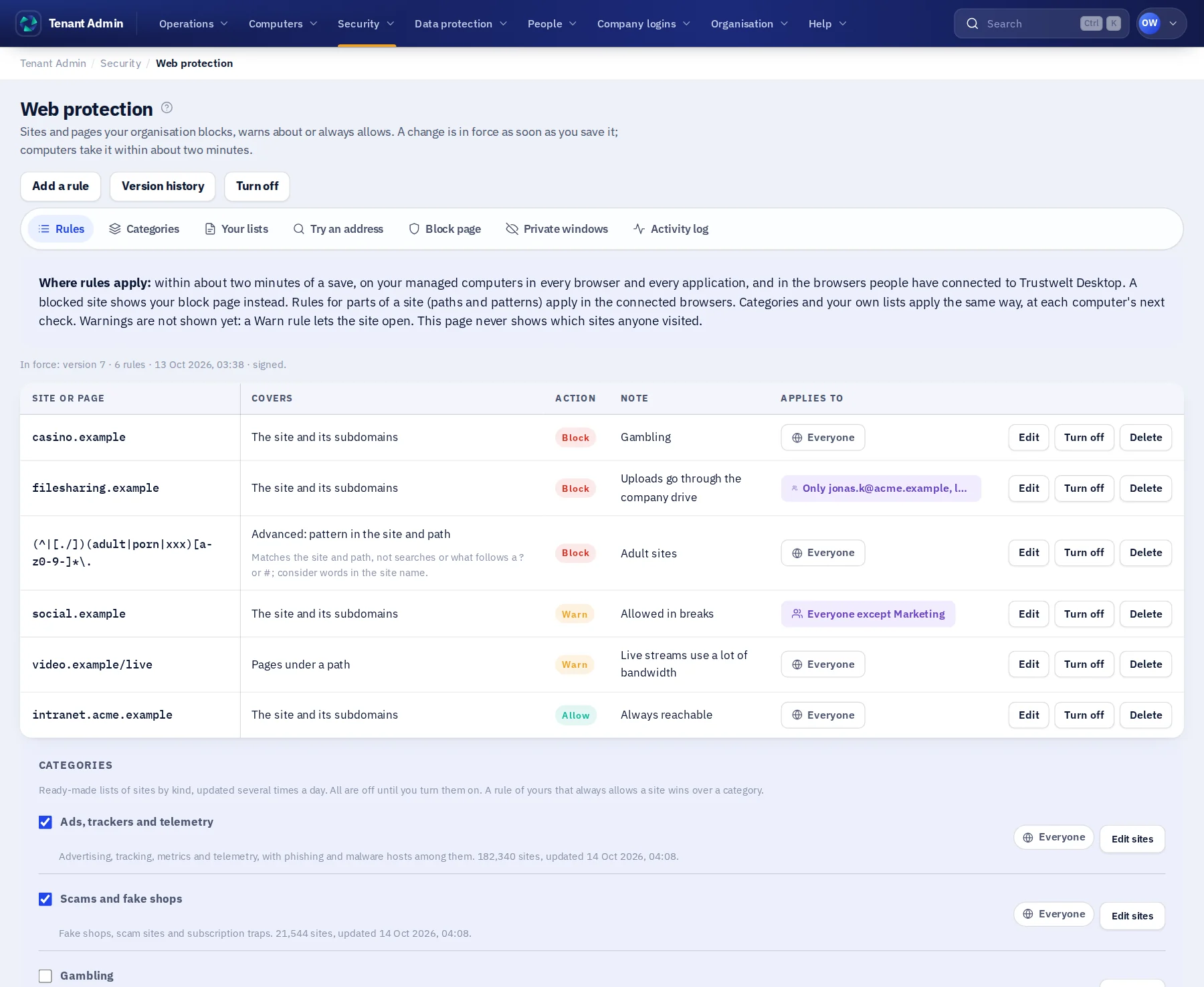
A rule is a sentence: this site and everything under it; pages under this path; any address with this word in its name. Block it, warn about it or always allow it. Save, and within about two minutes every managed computer applies it, in every browser and every application.
Sold on its own, per person per month. Works alone or with the other Trustwelt products. Security Center included. Runs on: Tenant Admin, Trustwelt Desktop and its browser extension on every computer; the network filter for every program on managed Linux computers.
What it does
Trustwelt Web Protection, in plain words.
Trustwelt Web Protection is web filtering for company computers, in every browser and, on managed Linux computers, every program.
- Rules
Plain rules, checked before saving
A site, a path, words in a site's name or, for experts, a pattern. Try an address to see what the rules decide. A words rule is checked against the most visited sites before it goes out.
- Lists
Categories and your own lists
Ready-made lists for ads and trackers, scams, gambling, adult content and more, updated several times a day, all off until you turn them on; your own .txt lists, one domain per line.
- Scope
Everyone, some, or everyone except
Each rule, category and list applies to everyone unless you say otherwise: only these groups and people, or everyone except them. A computer learns only what applies to its person.
- Block page
Your page, your words
A blocked site shows your organisation's page: your reason and whom to ask. Served from the computer, so it works offline too.
- Private windows
Your choice
Allowed by default. Blocks hold in a private window either way; turn private windows off and every rule applies in every window.
- Enforcement
In every browser and application
On managed computers the computer itself applies the rules by a site's name, so a second browser or a program that fetches the web follows them too.
Modules
Everything in Trustwelt Web Protection, each on its own page.
- Module
Site rules
About Site rules about Site rulesBlock, warn or allow a site, a part of a site or words in a name, in every application.
- Module
Categories and lists
About Categories and lists about Categories and listsReady-made categories and your own lists, kept up to date for you.
- Module
Allow list
About Allow list about Allow listSites and networks that are always allowed, above every category and list.
- Module
Block page and access requests
About Block page and access requests about Block page and access requestsYour words on a blocked site, and a way to ask for it.
- Module
Certificate check
About Certificate check about Certificate checkA site with a certificate the computer does not trust goes to the block page.
- Module
Web activity and browser history
About Web activity and browser history about Web activity and browser historyWhat was blocked, and, if you choose, what was opened; history kept in Trustwelt.
In Tenant Admin
What your administrators see.
What is recorded, and what never is
Your organisation sees this. Nothing else.
- Blocks and warningsThe site, the rule, the computer, the person and when; with the addresses involved.
- Allowed browsingOnly if you switch the full activity log on, and then your people are told in their Portal.
- Browser historyKept by Trustwelt Desktop on each computer (Trustwelt Endpoint); handed to the organisation only where it chose so, readable by the person and the main Tenant Admin alone.
Never:
- What a person typed into a page or saw on it.
- A rule applied to a search term or to what follows a ? or # in an address.
- A list that reaches a computer with other people's names: each computer gets only the filters for its person.
How a block happens
From a rule you save to a page your person sees, in six steps.
The rule is decided on the computer, by name, before any connection is made. Nothing about the page itself travels anywhere.
You write the rule
A site and everything under it, pages under a path, words in a site's name, a category or your own list; block, warn or allow; for everyone, some, or everyone except.
You try an address
The simulator says what the rules decide for it, and a words rule is checked against the most visited sites before it goes out.
It is signed and delivered
Within about two minutes every managed computer holds the new version, signed, cut to its person; a computer never goes back below a version it has seen.
The computer decides
By the site's name, in every browser and, on managed Linux computers, in every program; a private window or a second browser changes nothing; a bad certificate is stopped the same way.
The person sees your page
Your organisation's block page, in your words, with whom to ask; served from the computer, so it works offline. A warning lets them continue and says so.
The block is on record
The site, the rule, the computer, the person and when. Allowed browsing is not recorded unless you switch the full log on, and then your people are told.
Who sees what
Three parties, one table.
| Event | The person | The organisation | Trustwelt |
|---|---|---|---|
| A blocked or warned site | Your block page with the reason and whom to ask; in the Portal, what their organisation can see of them | The site, the rule, the computer, the person, when | The same record, to run the service |
| Allowed browsing | Their own history, kept by Trustwelt Desktop on their computer | Nothing, unless the full activity log is switched on, and then the person is told | Nothing |
| A request to open a site | The request they made and the answer | The request with the person's reason; the decision | The same record |
| The page's content | Everything, as always | Nothing: no content, no form, no search term | Nothing |
Alone or together
Each product stands on its own. Together they share what they know.
- Trustwelt Endpoint: browser security keeps the browser's history in Trustwelt and offers it as you type; Web Protection's rules decide what opens.
- Trustwelt DLP: a site blocked here is a site no file is uploaded to.
- Trustwelt Vault: a company login is filled only on a site the rules allow.
- Security Center (included): the events, reports and exports of every product you hold, in one place; each PDF stands as evidence with the time to the second and its SHA-256. Weekly or monthly reports made by Trustwelt itself and kept in a library, a breakdown by two dimensions with saved views, and a signed stream of events to your SIEM.
Specification
Where it runs and what it needs.
- Runs in
- Tenant Admin, Trustwelt Desktop and its browser extension on every computer; the network filter for every program on managed Linux computers.
- Delivery
- Rules go out signed with a version the computer never goes back below; in force within about two minutes.
- Lists
- HaGeZi categories, refreshed several times a day; your own lists up to 9 MB each.
- Also for
- Individuals on the Standard plan and families on the Family plan, with their own rules in the Portal.
Questions
Asked before buying.
- Does Trustwelt see what my people browse?
- No. The rules are checked on the computer. Trustwelt receives a record of blocks and warnings, and of visits only if you switch the full activity log on.
- What if a rule is wrong?
- Open the version history and go back to an earlier set; the change is in force within about two minutes.
- Does a person need to do anything?
- No. On a managed computer the rules apply without a question; the person sees your block page when a site is blocked.
Use cases
Step by step, from the problem.
Filter websites on company computers
Read the use case about Filter websites on company computersPhishing pages, gambling, file-sharing sites that walk around your storage rules: every organisation has a list of sites its computers should not open, and most have no way to enforce it.
Start with Trustwelt Web Protection.
An organisation account is free. Add the products you need, per person per month, and cancel any of them when you want.