
Trustwelt Endpoint
The computer itself, decided by you.
Trustwelt Endpoint is what an organisation decides about a managed computer: which devices it accepts, what its browsers may keep, which connections may come in, and whether it is healthy. Set once in Tenant Admin, applied through the operating system's own means, reported back as verified, applied or not, never assumed.
Sold on its own, per person per month. Works alone or with the other Trustwelt products. Security Center included. Runs on: Managed Linux computers in full; on macOS, USB storage and Bluetooth, the screen lock, browser security, computer health and the host firewall.
What it does
Trustwelt Endpoint, in plain words.
Trustwelt Endpoint is device control, browser security, a host firewall and computer health for company computers.
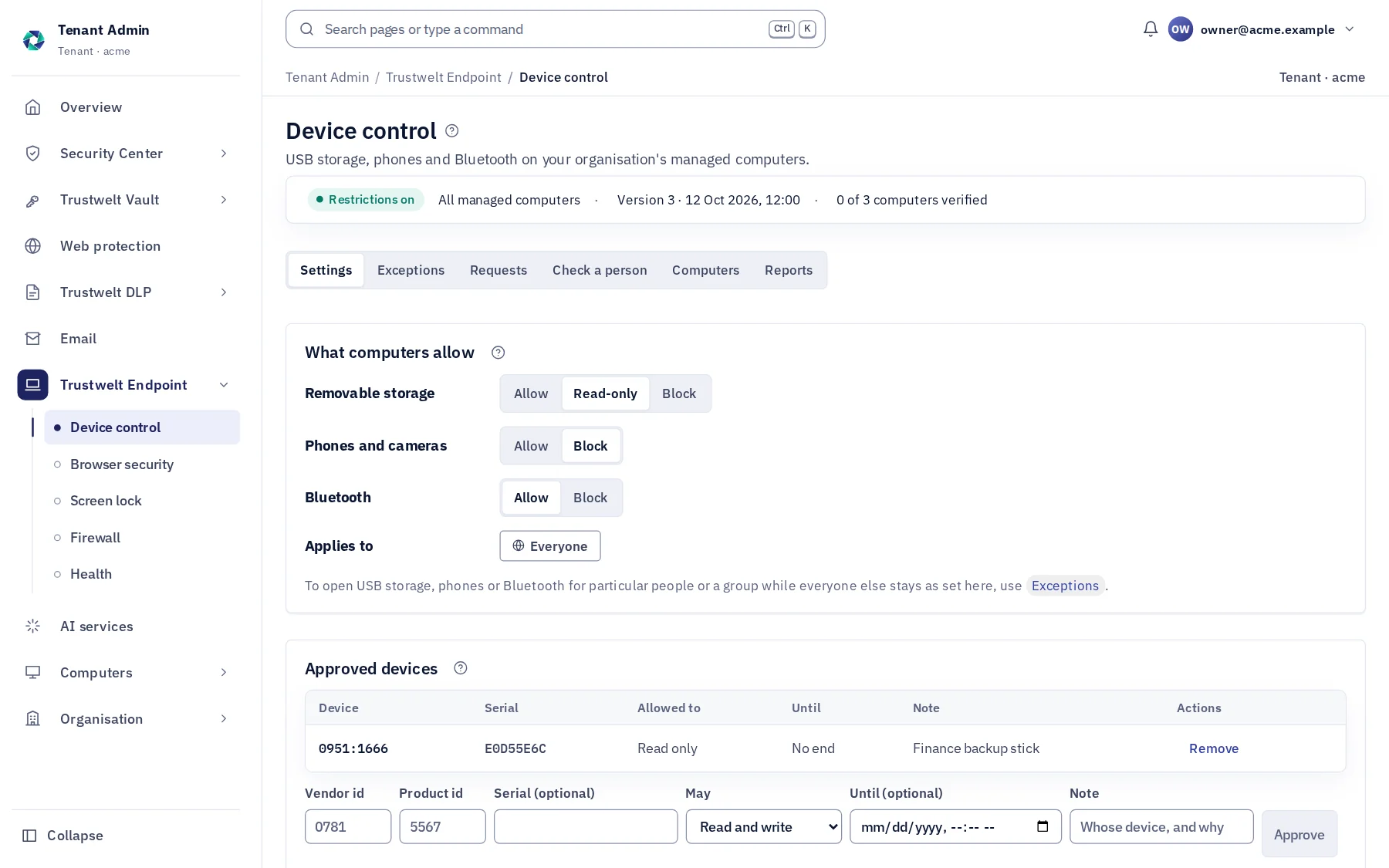
- Device control
USB storage, phones, Bluetooth
Blocked, read-only or allowed; devices you approve by vendor, model and serial; exceptions for a person or a group with an end, requests from the computer; every blocked device an event.
- Screen lock
The system's own lock, on time
The operating system's lock screen turned on across managed computers, locking after the idle minutes you set, with a minimum length for the system password; each computer reports its state.
- Browser security
The browser's own features, your call
Password manager, autofill, sync, history and bookmarks off by policy where Trustwelt holds them instead; an allowlist of extensions. History and bookmarks live in Trustwelt.
- Firewall
Inbound closed, opened by you
Through the system's own firewall: nothing connects in except the ports you or the person open; staff ask, an administrator approves; a change that would cut the network undoes itself.
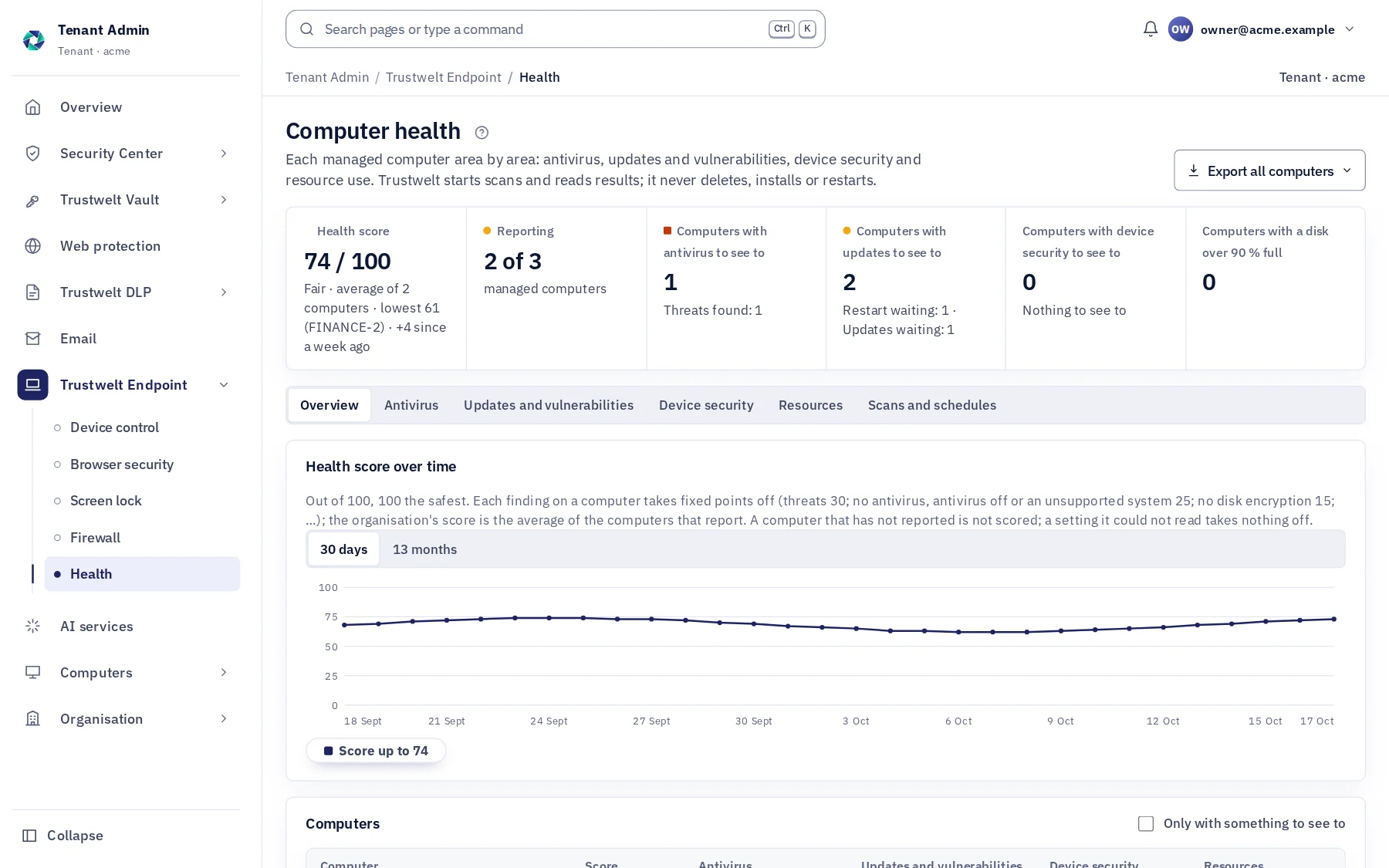
- Health
Antivirus, updates, vulnerabilities
The system's own antivirus (Defender, ClamAV, Bitdefender, ESET, Sophos, CrowdStrike and others), updates waiting, vulnerable packages, restarts due; scans scheduled or asked for.
- Device security
Encryption, Secure Boot, TPM, screen lock
Read from the computer and said plainly, including when a signal cannot be read; a signal the agent cannot read is never called healthy.
- Score
0 to 100, per computer and organisation
100 the safest; each point taken off is named; kept daily for 13 months; the organisation's score is the average with its lowest computer shown.
Modules
Everything in Trustwelt Endpoint, each on its own page.
- Module
Device control
About Device control about Device controlUSB storage, phones and Bluetooth: blocked, read-only or allowed.
- Module
Browser security
About Browser security about Browser securityThe browser's own password manager, autofill, sync and history, decided by you.
- Module
Host firewall
About Host firewall about Host firewallNothing connects into a computer unless you or the person open it.
- Module
Computer health
About Computer health about Computer healthAntivirus, updates, vulnerabilities and device security in one score.
- Module
Screen lock
About Screen lock about Screen lockThe system's own lock screen, on, after the idle time you set, with the password length you set.
In Tenant Admin
What your administrators see.
What is recorded, and what never is
Your organisation sees this. Nothing else.
- StatesFor each control on each computer: verified (proved by a test), applied (written, not proved by a test) or configured, with the mechanism and the reason.
- EventsA device blocked or made read-only, a port opened, a threat found, a scan run; with the computer, the person and when.
- HealthWhat the system's own services say: antivirus product and state, updates, vulnerable packages, device security signals, resource use.
Never:
- A remote shell or a script run on the computer: every action is a registered, signed one.
- A posture signal invented: unknown is unknown and is said so.
- A rule in your network's firewalls: the host firewall is the computer's own.
How a setting reaches a computer
From a switch in Tenant Admin to a state you can trust, in six steps.
Every control is applied through the operating system's own means and reported back as verified, applied or configured. A signal that cannot be read is never called healthy.
You decide
USB storage read-only, phones blocked, the browser's password manager off, inbound closed, the screen lock on after ten minutes; for everyone, or with exceptions per person or group that can end.
Signed and delivered
Each managed computer receives its own signed answer, cut to its person, within about two minutes; it never goes back below a version it has seen.
Applied by the system's own means
udev, blockdev and rfkill for devices, firewalld or ufw and pf for the firewall, browser policy files and managed preferences for the browsers, the system's lock screen; never a remote shell.
Proved where it can be
Verified when a test proves it, applied when written but not proved, configured when only set; said apart, with the mechanism and the reason.
Reported back
Each check-in brings the states, the antivirus the system reports, updates waiting, vulnerable packages, device security signals and resource use; a computer that stops reporting is said to have stopped, and you are told by e-mail.
Undone if it would cut the line
A firewall change is applied safely: the computer checks it keeps its connection to Trustwelt and undoes the change on its own if not.
Who sees what
Three parties, one table.
| Event | The person | The organisation | Trustwelt |
|---|---|---|---|
| A device blocked or made read-only | A notice on the computer, and the way to ask for an exception | The device by vendor, model and serial, the computer, the person, when; requests with their reason | The same record |
| A port opened | Their own request and the answer; on their own computer, their own firewall | Who opened what, on which computer, approved by whom | The same record |
| The browser's history and bookmarks | Theirs, in Trustwelt Desktop, offered as they type | Only where the organisation chose so, readable by the person and the main Tenant Admin alone | Ciphertext in sync, never readable |
| Health and the score | Their computer's state in words, in their Portal | Each computer's antivirus, updates, vulnerabilities, device security and score; the organisation's average with its lowest computer named | The same figures, to run the service |
Alone or together
Each product stands on its own. Together they share what they know.
- Trustwelt Web Protection: browser security keeps the browser's history in Trustwelt Desktop and offers it as the person types; Web Protection's rules decide what opens.
- Trustwelt DLP: device control makes the USB drives DLP would record read-only or blocks them.
- Trustwelt Secure MailGW: closes the other mail channels on managed computers and installs the Thunderbird check.
- Trustwelt Vault: with the browser's own password manager off, company logins live only in Trustwelt.
- Security Center (included): the events, reports and exports of every product you hold, in one place; each PDF stands as evidence with the time to the second and its SHA-256. Weekly or monthly reports made by Trustwelt itself and kept in a library, a breakdown by two dimensions with saved views, and a signed stream of events to your SIEM.
Specification
Where it runs and what it needs.
- Runs on
- Managed Linux computers in full (udev, blockdev, rfkill, firewalld or ufw, browser policy files); on macOS USB storage and Bluetooth, the screen lock, browser security, health and the firewall (managed preferences, pf).
- Delivery
- Signed per-computer answers with versions the computer never goes back below; applied at the next check, within about two minutes.
- Health
- Read from the system's own services; another vendor's antivirus is reported as that vendor's; metrics kept 30 days, daily 13 months.
- Plan
- Sold on its own, per person per month; for organisations. The firewall is also part of Standard and Family for a person's own computers.
Questions
Asked before buying.
- Does a person have to do anything?
- No. On a managed computer the person types their master password once; Trustwelt Desktop is always on and applies what the organisation decided.
- Will it fight our antivirus?
- No. Trustwelt Endpoint reads what your antivirus reports and asks it to scan; it does not replace it.
- Can a port be opened by mistake and lock us out?
- A firewall change is applied safely: the computer checks it keeps its connection to Trustwelt and undoes the change on its own if not.
Use cases
Step by step, from the problem.
Control USB drives on company computers
Read the use case about Control USB drives on company computersA USB drive is the quickest way to take a folder home, and the quickest way to bring something unwanted in. On most company computers, any drive works.
Start with Trustwelt Endpoint.
An organisation account is free. Add the products you need, per person per month, and cancel any of them when you want.