
Trustwelt AI Security · Policies
One list of policies. The first that decides, decides.
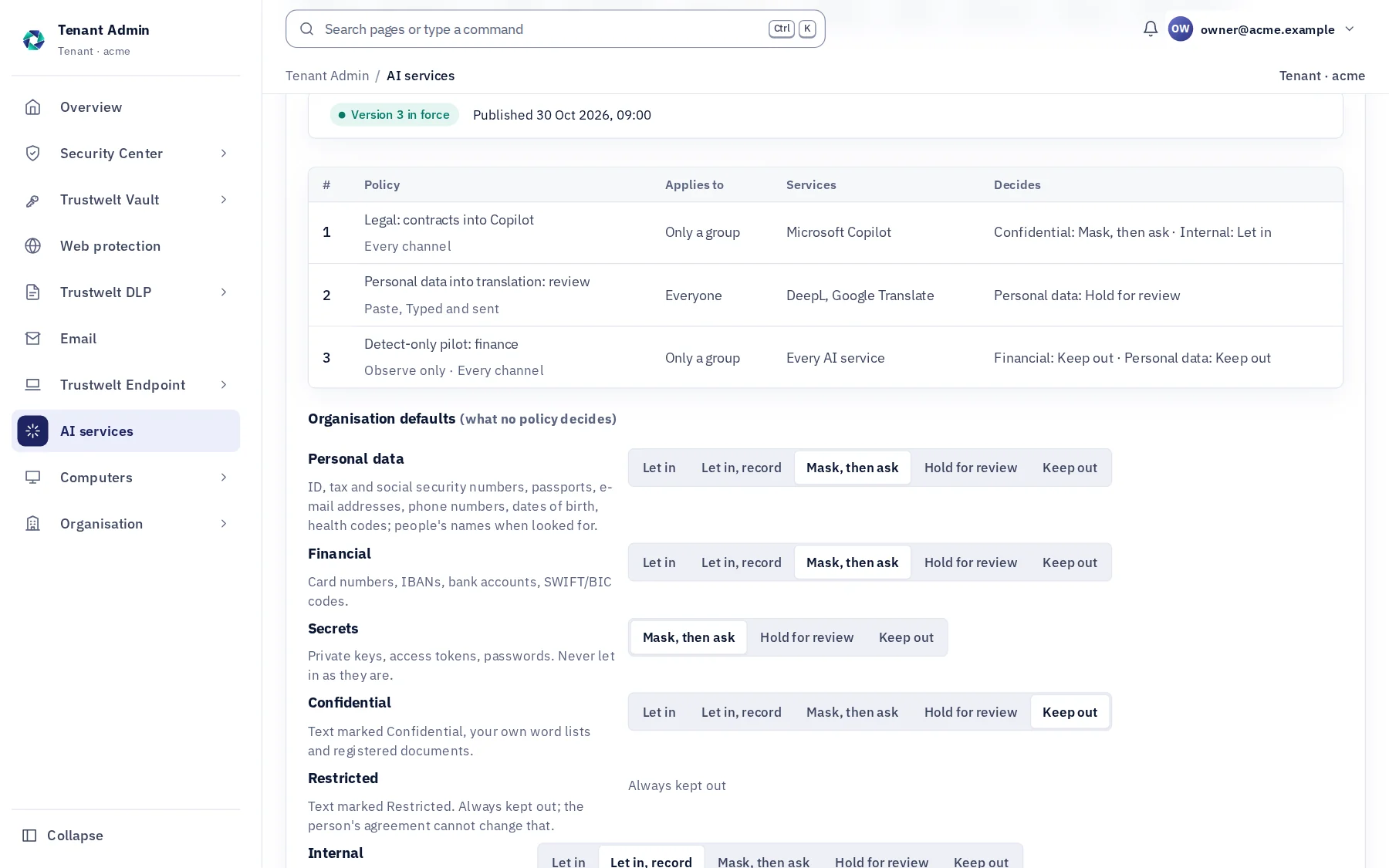
A policy says, for the people it applies to, on the services and channels it names, what happens to each class of data. The first policy in the list that decides a class wins; what no policy decides follows your organisation's defaults. Legal may give confidential text to one approved assistant and nobody else; personal data typed into a translation service may wait for your answer; a new rule may only observe for a week before it bites.
A module of Trustwelt AI Security, included with it. Runs on: Managed computers with Trustwelt Desktop and its browser extension: the Chromium family and Firefox on Linux, Firefox on Windows; the AI agent gateway on managed Linux computers; other programs through the network filter, sites only.
What it does
Policies, in plain words.
- Scope
People, services, channels
Everyone, or named people and access groups; every service or named ones; paste, drop, upload, send, or all.
- Actions
Five, per class
Let in; let in and record; mask, then ask; hold for review until an administrator answers; keep out.
- Observe
Record what it would do
An observe policy lets the text in and records the decision it would have made, so you see the effect before you enforce it.
- Guardrails
What no policy loosens
Restricted data is always kept out; a secret is never let in as it is, even under observe.
- Lifecycle
Write, publish, pilot, roll back
Changes stay unpublished until you publish them; a version can go to a pilot group first; every version is kept and any can be published again. No second approval is needed.
- Start
Templates and the simulator
Start from Protect personal data, Protect secrets, Approved AI only or a Detect-only pilot; ask the simulator what would happen to chosen classes for a person on a service, and which policy decides.
How it works
From the console to the computer.
Write
Tenant Admin › AI services › Policies: add a policy or a template, order the list, set the defaults.
Simulate
A person, a service, a channel, the classes: the decision and the policy that made it, with no text involved.
Publish
To everyone or to a pilot group. Each computer gets its own statement at its next check.
In Tenant Admin
What your administrators see.
What is recorded, and what never is
Your organisation sees this. Nothing else.
- VersionsEvery published version with who published it and when; saved changes with before and after in the audit log.
- DecisionsEvery input check names the policy version and the policies that decided it.
Never:
- A policy that lets restricted data through or a secret in as it is: the guardrails hold whatever is written.
- Text kept by the simulator: it works from the classes you choose.
Specification
Where it runs and how it is sold.
- Needs
- Managed computers with the current Trustwelt Desktop; an older Desktop applies the strictest action everywhere, and Coverage says so.
- Limits
- Up to 100 policies; every version kept.
- Sold as
- Part of Trustwelt AI Security.
Questions
Asked before buying.
- Does a stricter policy lower in the list ever win?
- No. The first policy in the list that decides a class decides it; you order the list. The guardrails apply on top, whatever the order.
- Can I try a policy without stopping anyone?
- Yes. Set it to observe, or publish the version to a pilot group first. Observe records what it would have done; the pilot applies it to the group alone.
More in Trustwelt AI Security
The other modules, and what works with this one.
- Trustwelt AI Security
What goes into AI services
About What goes into AI services about What goes into AI servicesWhat is pasted, dropped, uploaded or sent is checked on the computer before the site gets it.
- Trustwelt AI Security
Held for review, and cases
About Held for review, and cases about Held for review, and casesA text a policy held waits for your answer; what needs a look becomes a case.
- Trustwelt AI Security
AI services and categories
About AI services and categories about AI services and categoriesThe AI and language services Trustwelt knows, each approved, restricted, blocked or left open.
- Trustwelt AI Security
Names of people and organisations
About Names of people and organisations about Names of people and organisationsA model on the computer finds names in the text; no name leaves for checking.
- Trustwelt AI Security
Coverage
About Coverage about CoveragePer computer: checked, checked less, or not seen. Counted apart, never added into a score.
- Trustwelt AI Security
The browsers' own AI, and extensions
About The browsers' own AI, and extensions about The browsers' own AI, and extensionsGemini, Copilot and Firefox's chatbot off by policy; the extensions installed, in one list.
Start with Trustwelt AI Security.
Policies comes with Trustwelt AI Security, sold on its own per person per month. An organisation account is free.