
Trustwelt Endpoint · Device control
Which devices a computer accepts.
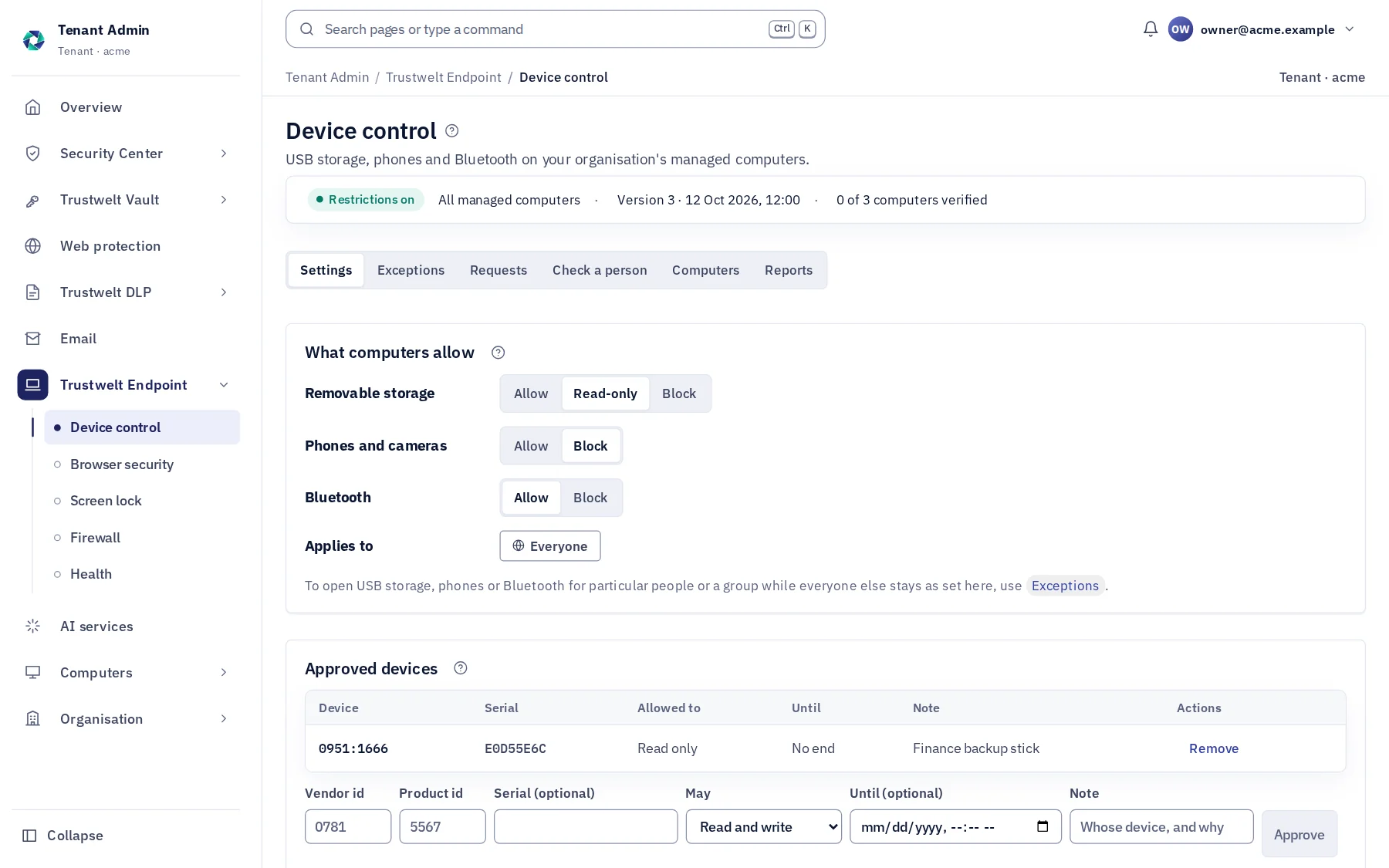
Decide what may be plugged into a company computer: USB drives read-only, phones and cameras blocked, Bluetooth allowed, the encrypted drives your team uses approved by their serial. Applied through the operating system's own means and reported back as verified, applied or not.
A module of Trustwelt Endpoint, included with it. Runs on: Managed Linux computers in full; on macOS, USB storage and Bluetooth, the screen lock, browser security, computer health and the host firewall.
What it does
Device control, in plain words.
- Storage
Blocked, read-only, allowed
For USB drives and memory cards.
- Approved
By vendor, model and serial
The devices you trust work where others are blocked.
- Other
Phones, cameras, Bluetooth
Each with its own setting.
- Honest state
Verified, applied, configured
Proved by a test, written but not proved by a test, or only configured: said apart for every computer.
- Exceptions
For a person or a group, with an end
Open USB drives for the finance team until the audit ends, or a phone for one person for a week; the computer reverts by itself when the time is up, even offline.
- Requests
Asked from the computer
A person asks for a drive, a phone or Bluetooth from Trustwelt Desktop, with a reason and for a day, a week or a month; an administrator approves or refuses, and the answer appears where they asked.
How it works
From the console to the computer.
Decide
Tenant Admin › Device control: the rule for everyone, then exceptions per person or group, each with an end.
Applied
Signed to each computer, applied at its next check.
Reported
Each computer's state and every blocked device.
In Tenant Admin
What your administrators see.
What is recorded, and what never is
Your organisation sees this. Nothing else.
- EventsA device blocked, made read-only or allowed by an exception, with the computer, the person and when.
- ReportsWho may use what now and until when, every request with its answer, every change with before and after; as CSV or a PDF that stands as evidence.
Never:
- A device allowed silently because a setting could not be applied: that is reported.
- An exception without an end that nobody can see: every exception is listed with who opened it and until when.
Specification
Where it runs and how it is sold.
- Runs on
- Managed Linux computers (udev, blockdev, rfkill): USB storage, phones and cameras, Bluetooth. macOS: USB storage blocked (ejected) or read-only, and Bluetooth.
- Sold as
- Part of Trustwelt Endpoint.
Questions
Asked before buying.
- Does a blocked drive lose data?
- No. A blocked drive is not mounted; read-only lets files be read and nothing written.
More in Trustwelt Endpoint
The other modules, and what works with this one.
- Trustwelt DLP
File activity
About File activity about File activityCopies to USB drives, uploads, printing and archives, recorded on the computer.
- Trustwelt Endpoint
Computer health
About Computer health about Computer healthAntivirus, updates, vulnerabilities and device security in one score.
- Trustwelt Endpoint
Browser security
About Browser security about Browser securityThe browser's own password manager, autofill, sync and history, decided by you.
- Trustwelt Endpoint
Host firewall
About Host firewall about Host firewallNothing connects into a computer unless you or the person open it.
- Trustwelt Endpoint
Screen lock
About Screen lock about Screen lockThe system's own lock screen, on, after the idle time you set, with the password length you set.
Start with Trustwelt Endpoint.
Device control comes with Trustwelt Endpoint, sold on its own per person per month. An organisation account is free.