
Trustwelt Endpoint · Screen lock
Every managed computer locks itself. You say when.
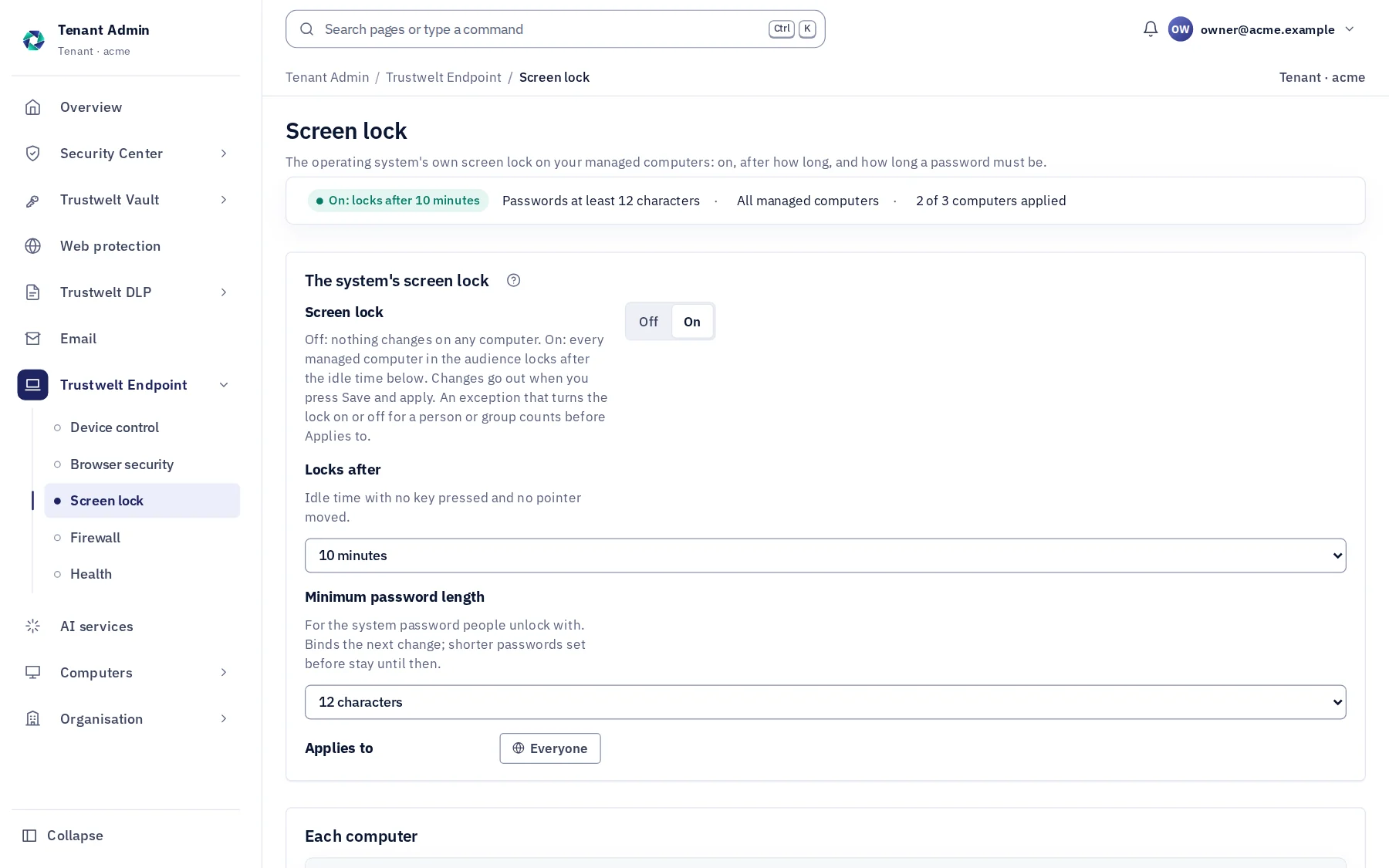
No lock screen of Trustwelt's: the one the operating system already has, turned on everywhere and set from Tenant Admin — after how many idle minutes it locks, and how long the system password people unlock with must be. People see nothing new; the screen they know simply comes on time.
A module of Trustwelt Endpoint, included with it. Runs on: Managed Linux computers in full; on macOS, USB storage and Bluetooth, the screen lock, browser security, computer health and the host firewall.
What it does
Screen lock, in plain words.
- On
Turned on, kept on
On every managed computer in the audience; on GNOME the setting is locked so nobody turns it off.
- When
1 to 60 minutes idle
No key pressed, no pointer moved for the time you choose; then the system's own lock screen.
- Password
A minimum length
For the system password: 8 to 20 characters, binding from the next change.
- Said
Each computer reports
Applied, configured or failed, with the reason in words, as device control reports.
How it works
From the console to the computer.
Set
Tenant Admin › Trustwelt Endpoint › Screen lock: on, the idle time, the password length, the audience.
Applied
Signed to each computer with the device-control document; the desktop's own settings and the X screen saver on Linux, the screen saver preferences on macOS.
Reported
Each computer's state, and the lockers it has.
In Tenant Admin
What your administrators see.
What is recorded, and what never is
Your organisation sees this. Nothing else.
- Settings and statesWhat was set, by whom and when; each computer's state and reason. Nothing about when a person locks or unlocks, and never a password.
Never:
- A lock screen of Trustwelt's between the person and their session.
- A password changed by Trustwelt: the length rule binds the person's next change.
Specification
Where it runs and how it is sold.
- Runs on
- Managed Linux and macOS computers. Linux: GNOME and KDE Plasma through their locked system settings, every X11 desktop through the X screen saver set and watched by Trustwelt Desktop, the password length through the password-quality rule. macOS: the screen saver's managed preferences and a rule of its own in the account password policies; a configuration profile already there is left alone.
- Sold as
- Part of Trustwelt Endpoint.
Questions
Asked before buying.
- Does this replace the lock screen?
- No. The operating system's own lock screen stays; Trustwelt turns it on and sets when it locks and how long the password must be.
- What about a password that is already shorter?
- It stays until the person changes it; the new length binds the change. The page says so.
More in Trustwelt Endpoint
The other modules, and what works with this one.
- Trustwelt Endpoint
Browser security
About Browser security about Browser securityThe browser's own password manager, autofill, sync and history, decided by you.
- Trustwelt Endpoint
Device control
About Device control about Device controlUSB storage, phones and Bluetooth: blocked, read-only or allowed.
- Trustwelt Endpoint
Host firewall
About Host firewall about Host firewallNothing connects into a computer unless you or the person open it.
- Trustwelt Endpoint
Computer health
About Computer health about Computer healthAntivirus, updates, vulnerabilities and device security in one score.
Start with Trustwelt Endpoint.
Screen lock comes with Trustwelt Endpoint, sold on its own per person per month. An organisation account is free.