
Trustwelt Vault
Company logins and cards, used but never shown.
A shared login that people can read is a login that leaves with them. Trustwelt Vault lets your people and teams use the organisation's logins and payment cards with a one-time permission per fill; the password and the card number never appear on screen, and every use is on record.
Sold on its own, per person per month. Works alone or with the other Trustwelt products. Security Center included. Runs on: Trustwelt Desktop and its browser extension on Linux, Windows and macOS; Tenant Admin; the Business and Enterprise plans.
What it does
Trustwelt Vault, in plain words.
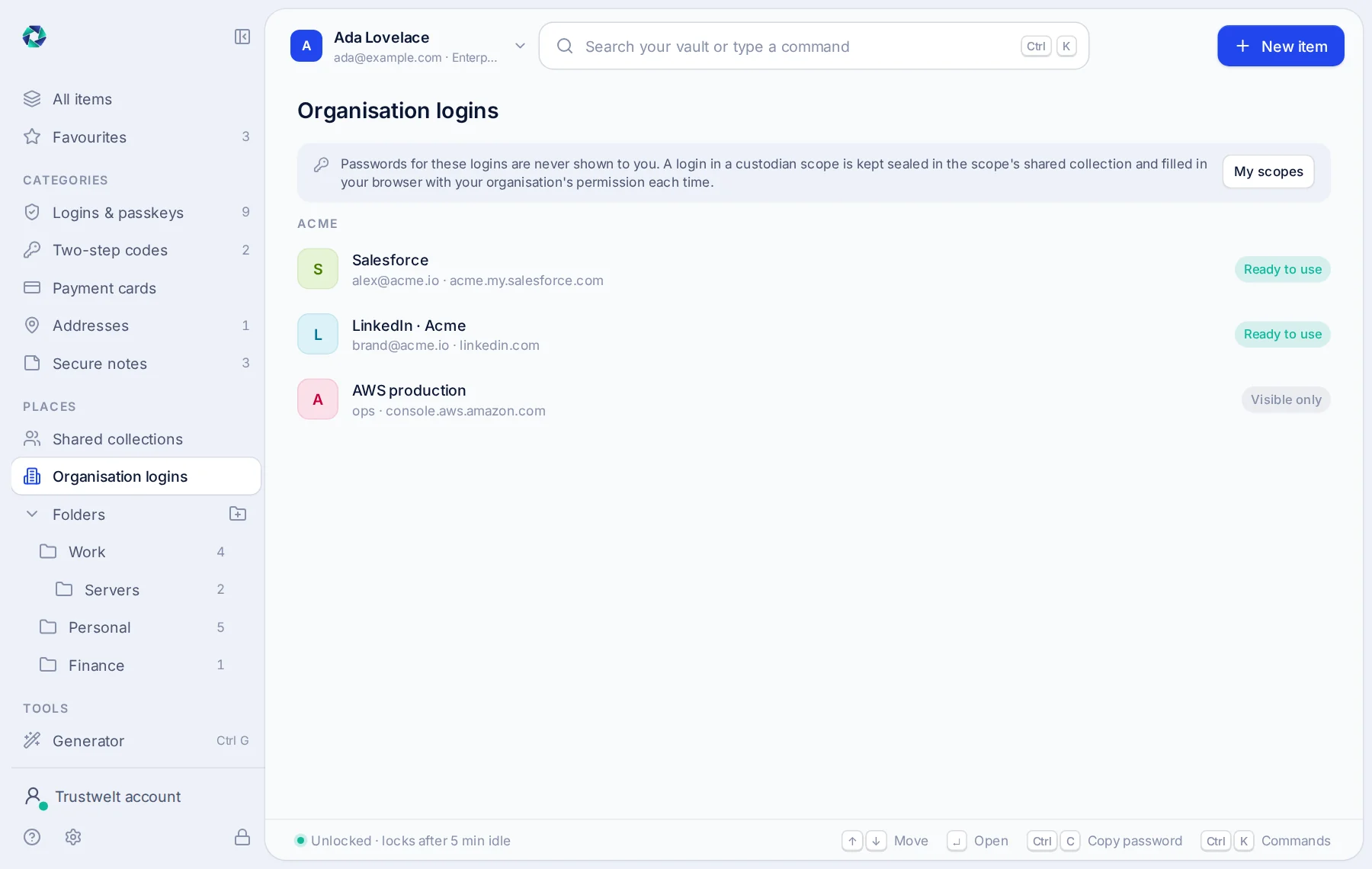
Trustwelt Vault is a business password and payment card manager: people use company logins and cards without ever seeing them.
- Company logins
Filled, never revealed
The browser extension fills a company login on the site it belongs to after the server grants it for sixty seconds. No one copies a password out.
- Company cards
Paid with, never read
Finance enters the card once; staff pay with it after your permission; the number is never on their screen; every payment is in the usage audit with its amount.
- Access
Grants, requests and the matrix
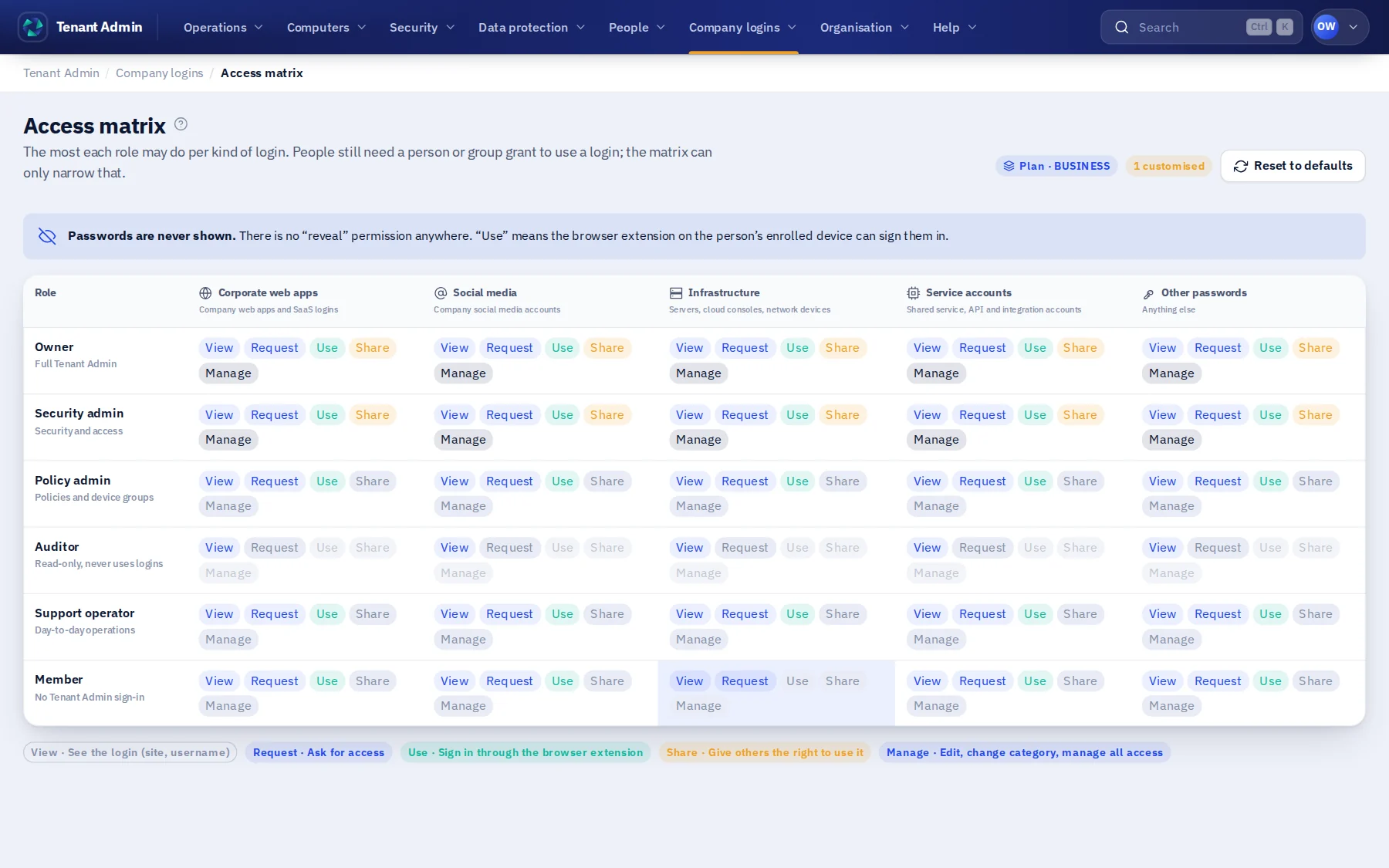
People groups, one-time and standing grants, access requests approved by an admin, and a role ceiling that says what each role may hold, by category.
- Custody
Sealed areas with break-glass
Finance, HR, IT and your own areas, each with custodians who alone open them; a takeover after 72 hours without objection, on Enterprise.
- Delegation
Admin areas
A main Tenant Admin who can do everything; HR, IT and security admins who reach their area and nothing else.
- Record
The usage audit
Who used which company item, when, from which computer; exported as CSV or as a PDF that stands as evidence.
Modules
Everything in Trustwelt Vault, each on its own page.
- Module
Company logins
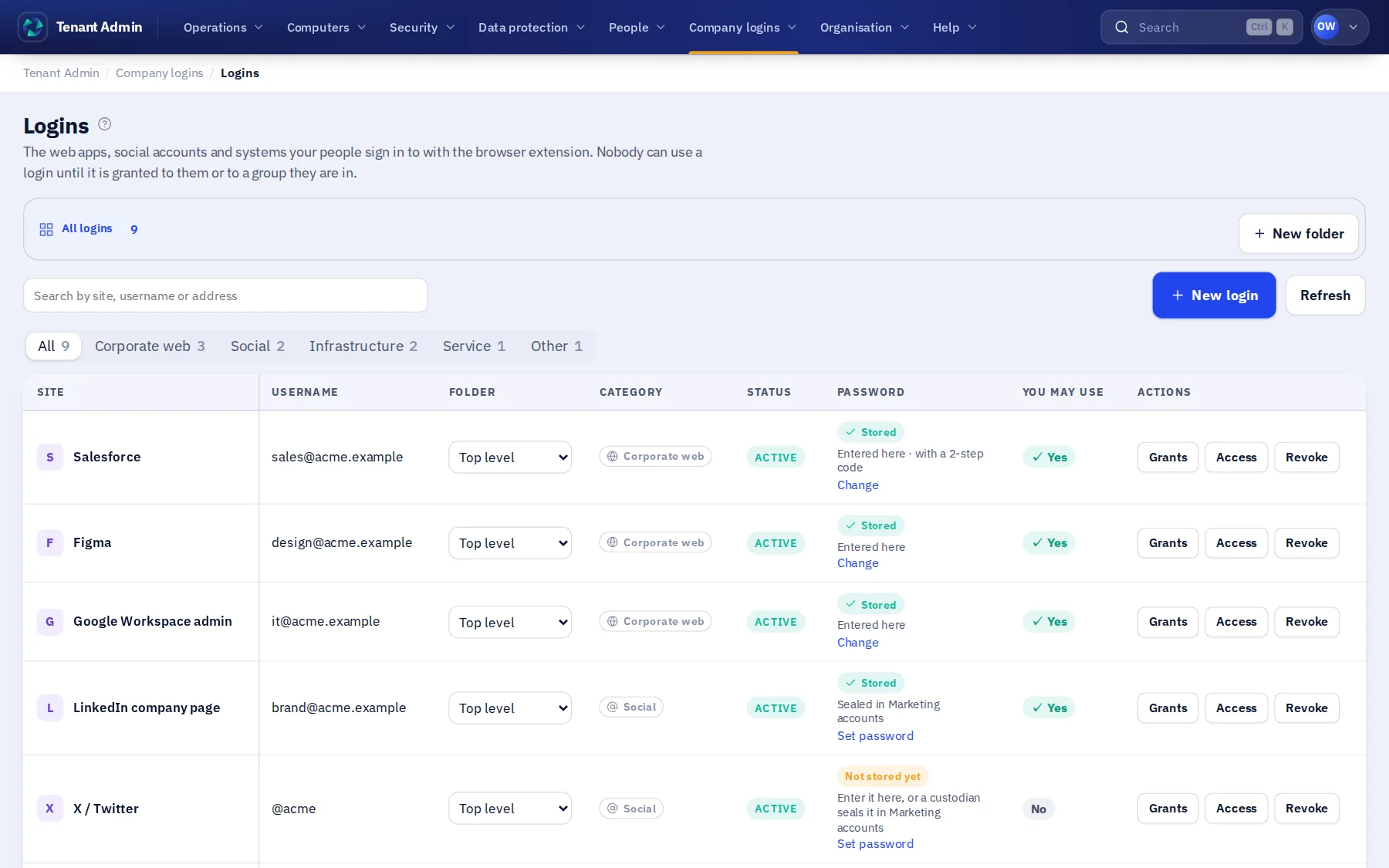
About Company logins about Company loginsShared accounts used by the right people, without anyone seeing the password.
- Module
Company cards
About Company cards about Company cardsPayment cards used for the organisation, with the number never handed over.
- Module
Custodian scopes and requests
About Custodian scopes and requests about Custodian scopes and requestsAreas run by the people who own them, and access asked for in the open.
- Module
Usage audit
About Usage audit about Usage auditEvery use of every company login and card, in one record.
- Module
Company servers
About Company servers about Company serversSSH keys for company servers, used from people's terminals and AI agents without being handed over.
In Tenant Admin
What your administrators see.
What is recorded, and what never is
Your organisation sees this. Nothing else.
- Every useWhich company login or card was used, by whom, when, from which computer, on which site; a denied fill and why.
- Every decisionGrants given and revoked, requests approved or denied, scopes opened, in the hash-chained audit log.
- Metadata onlyTrustwelt keeps the login's site, name and category; the secret is sealed to the organisation's key and shown to no one.
Never:
- A company password or card number on a person's screen, in a log or in an export.
- A fill on a site the login does not belong to.
- A grant decided in the browser: the server decides every fill.
How a fill happens
From a click in the password field to a login filled, in six steps.
The person never meets the password. The browser, the vault on the computer and the server each do one part, and the record is written before the form is filled.
The person clicks Trustwelt
On the sign-in page of a site the login belongs to, the extension offers the company login by its name. Nothing is offered on any other site.
The server decides
The fill is granted for that person, that login and that site, for sixty seconds, from the grants, the access matrix and the custodian scope. The browser never decides.
The vault unseals
On the computer, the vault service opens the company item sealed to the organisation's key; the password exists in the service's memory and nowhere else.
The field is filled
The extension writes the password into the site's own field and submits. It is never shown, never copied to the clipboard, never readable by the page's scripts afterwards.
The use is recorded
Who, which login, which computer, which site, when, in the usage audit; a refused fill with its reason. The record is chained with SHA-256.
The grant ends
Sixty seconds later the grant is gone. A standing grant lasts as long as the membership; a leaver's grants end with it, and nothing needs rotating because nothing was seen.
Who sees what
Three parties, one table.
| Event | The person | The organisation | Trustwelt |
|---|---|---|---|
| A company login filled | The login's name and the site; the fill itself; in the Portal, every use of their own | Who filled which login, on which computer and site, when; refused fills with the reason | The same record; the password sealed to the organisation's key, never opened |
| A company card paid with | The card's label and last four digits; the payment confirmed | Who paid with which card, where, the amount, when | The same record; never the number or the security code |
| A grant, a request, a scope change | Their own grants and requests, and the answer | Every grant given and revoked, request approved or denied, scope opened, in the hash-chained audit | The same audit, to run the service |
| A person's own logins and cards | Everything, in their vault on their computer | Counts at most; never a site, an item or a use | Ciphertext only: Trustwelt never holds the key |
Alone or together
Each product stands on its own. Together they share what they know.
- Trustwelt Endpoint: with browser security, the browser's own password manager is off and company logins live only in Trustwelt.
- Trustwelt DLP: a document that holds a company card number is a finding like any other.
- Trustwelt Web Protection: a login is filled only on a site your rules allow.
- Security Center (included): the events, reports and exports of every product you hold, in one place; each PDF stands as evidence with the time to the second and its SHA-256. Weekly or monthly reports made by Trustwelt itself and kept in a library, a breakdown by two dimensions with saved views, and a signed stream of events to your SIEM.
Specification
Where it runs and what it needs.
- Runs in
- Tenant Admin (your organisation's own address), the Portal, Trustwelt Desktop and its browser extension on Windows, macOS and Linux.
- Tiers
- Business and Enterprise. Enterprise adds custodian takeover, two-person recovery and the organisation's own logo on PDFs.
- Browsers
- Chrome, Edge, Brave, Vivaldi, Firefox, LibreWolf, Waterfox, Floorp and Zen.
- Keys
- The vault is encrypted on the computer (Argon2id, XChaCha20-Poly1305); company items are sealed to the organisation's key; Trustwelt holds ciphertext.
Questions
Asked before buying.
- Can a person export a company password?
- No. There is no screen, API or export that returns it; the extension fills it into the site's field, and only after the server granted that fill.
- Do I need the other products?
- No. Trustwelt Vault works alone; an organisation account is free and you add the people who use it.
- What happens when someone leaves?
- Their grants end with their membership, their sessions are revoked, and the logins they used stay where they are: nothing to rotate because nothing was seen.
Use cases
Step by step, from the problem.
Share company logins without revealing the password
Read the use case about Share company logins without revealing the passwordA supplier portal, a social account, a bank's admin site: the organisation owns the login, several people need it, and the password ends up in a chat, a spreadsheet or someone's head.
Start with Trustwelt Vault.
An organisation account is free. Add the products you need, per person per month, and cancel any of them when you want.