
Trustwelt AI Security · Model gateway and keys
The agent calls the model through Trustwelt. The key stays in the vault.
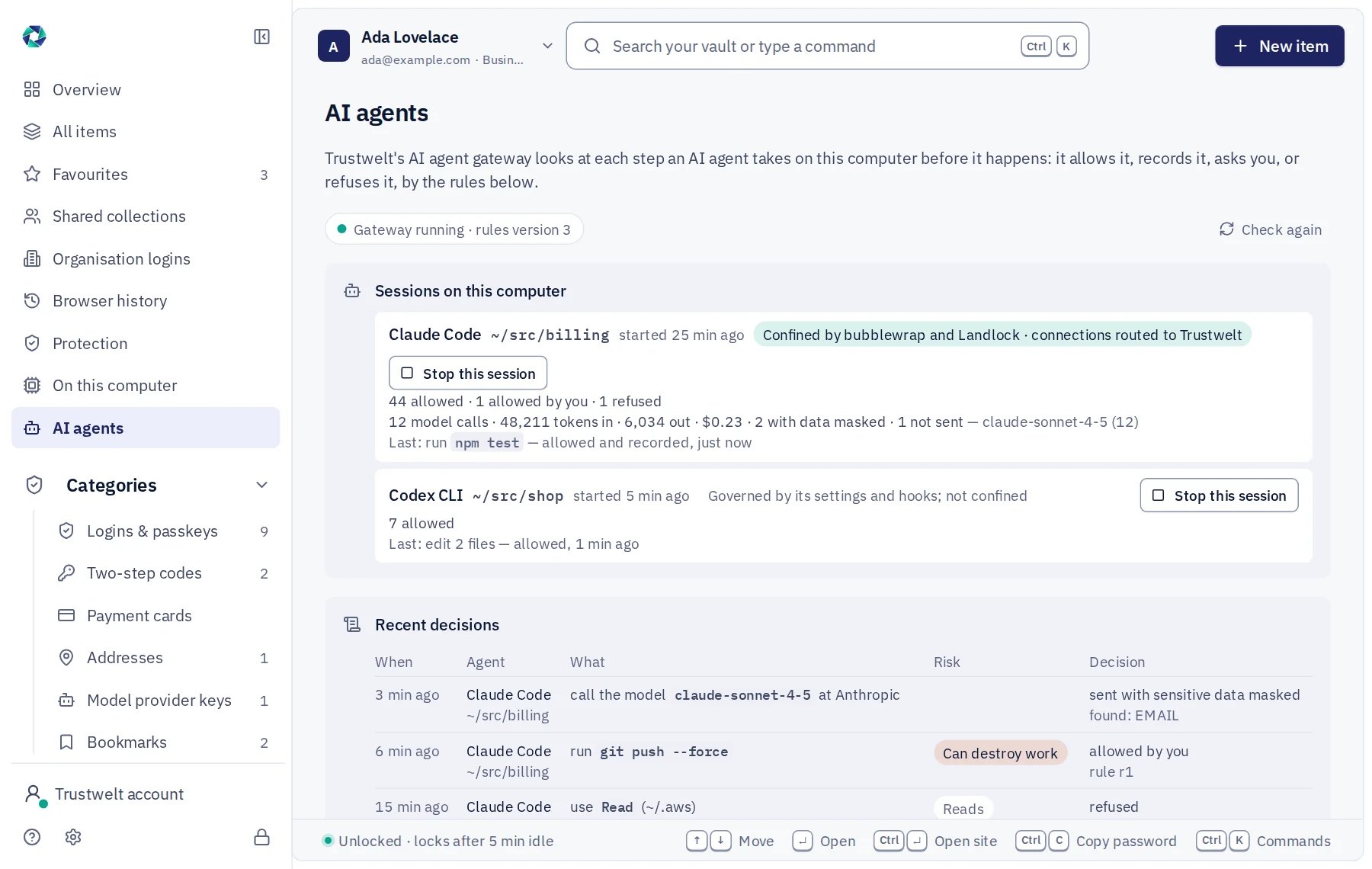
An agent's prompt is the richest channel out of a computer: the code it read, the file it opened, the output of the command it ran. On a managed computer every model call of a governed agent goes to a small proxy on the same computer. The proxy checks the texts, puts the key in, streams the answer back and counts the tokens.
A module of Trustwelt AI Security, included with it. Runs on: Managed computers with Trustwelt Desktop and its browser extension: the Chromium family and Firefox on Linux, Firefox on Windows; the AI agent gateway on managed Linux computers; other programs through the network filter, sites only.
What it does
Model gateway and keys, in plain words.
- Providers
Yours, and only yours
Anthropic, OpenAI, Google Gemini, Azure OpenAI and an OpenAI-compatible endpoint of your own; allowed models by exact name or prefix; a call to anything else is refused in the provider's own error shape.
- Data gate
Prompts and tool results, checked
System prompts, the person's turns and tool results pass the detectors of the input check, the registered lists and the names model, under the policy for the agent channel: masked in place, held, or refused. A text found clean is remembered by its fingerprint.
- Injection
Instructions hidden in a tool result
Phrases aimed at the model, role tags and hidden Unicode in what a tool returned are marked as suspected injection and stripped when your policy says so.
- Keys
From the vault, for the call
API keys, model keys and cloud roles are vault items with an agent-use rule: which agents, which hosts, which workspaces, whether to ask. The key is held in memory for the call and wiped; the agent never receives it.
- Cost
Tokens and money per call
Input, output and cache tokens from the provider's own usage figures, priced from the table in your agent rules; per person, access group, agent and model in Agent analysis.
- Your gateway
Route through your own
An organisation with an AI gateway of its own names it once; every model call of every agent goes there instead of to the provider.
How it works
From the console to the computer.
Allow providers and models
In Agent rules: the providers on, the models allowed, the prices, and an optional gateway of your own.
Point the agents at it
Trustwelt's root helper writes each agent's managed settings with the local gateway as its endpoint; the agent needs no key of its own.
Hold the keys in the vault
Move a key from a file into Trustwelt Desktop as an API key or model key, set its agent-use rule, delete the file.
Read the figures
Model calls with tokens, cost, what the data gate found and whether the call was masked or refused, per session and per period.
In Tenant Admin
What your administrators see.
What is recorded, and what never is
Your organisation sees this. Nothing else.
- Each model callProvider and host, model, tokens in and out, cache tokens, cost, duration, whether it streamed, the kinds of data found and how many, the decision.
- Key useThat an item was used for a provider, by which agent in which workspace, and whether the person was asked.
Never:
- The prompt, the system prompt or the model's answer: the gate reads them on the computer and keeps a fingerprint at most.
- A key handed to the agent, written to a file or logged: it goes into the request on the computer and is wiped.
- A call to a provider or model the organisation did not allow.
Specification
Where it runs and how it is sold.
- Runs on
- Managed Linux computers with the current Trustwelt Desktop; the person's own computer through their own agent rules.
- Speaks
- Anthropic Messages and token counting; OpenAI Chat Completions, Responses and models; Gemini generate, stream and count; Azure OpenAI deployments; any OpenAI-compatible endpoint.
- Limits
- A request over 4 MiB is refused; keys live in memory for at most five minutes.
- Sold as
- Part of Trustwelt AI Security.
Questions
Asked before buying.
- Does the agent still work when the key is in the vault?
- Yes. The agent sends its request with a stand-in key or none at all; the gateway puts the real key in on the computer. If the item's rule says to ask, Trustwelt Desktop asks the person once or for the session.
- Does the same policy apply to a paste and to an agent's prompt?
- The same detectors and classes, under the policy for the agent channel. Where no policy names that channel, the policies for typed messages apply.
More in Trustwelt AI Security
The other modules, and what works with this one.
- Trustwelt AI Security
Agent gateway
About Agent gateway about Agent gatewayEach tool call of Claude Code, Codex, Copilot, Cursor and Gemini CLI decided on the computer: allow, ask or refuse.
- Trustwelt AI Security
What goes into AI services
About What goes into AI services about What goes into AI servicesWhat is pasted, dropped, uploaded or sent is checked on the computer before the site gets it.
- Trustwelt AI Security
Policies
About Policies about PoliciesWho may send what to which service: drafted, simulated, published, versioned.
- Trustwelt AI Security
AI services and categories
About AI services and categories about AI services and categoriesThe AI and language services Trustwelt knows, each approved, restricted, blocked or left open.
- Trustwelt AI Security
Names of people and organisations
About Names of people and organisations about Names of people and organisationsA model on the computer finds names in the text; no name leaves for checking.
- Trustwelt AI Security
Held for review, and cases
About Held for review, and cases about Held for review, and casesA text a policy held waits for your answer; what needs a look becomes a case.
Start with Trustwelt AI Security.
Model gateway and keys comes with Trustwelt AI Security, sold on its own per person per month. An organisation account is free.