Endpoint security for organisations

Identity is not enough.

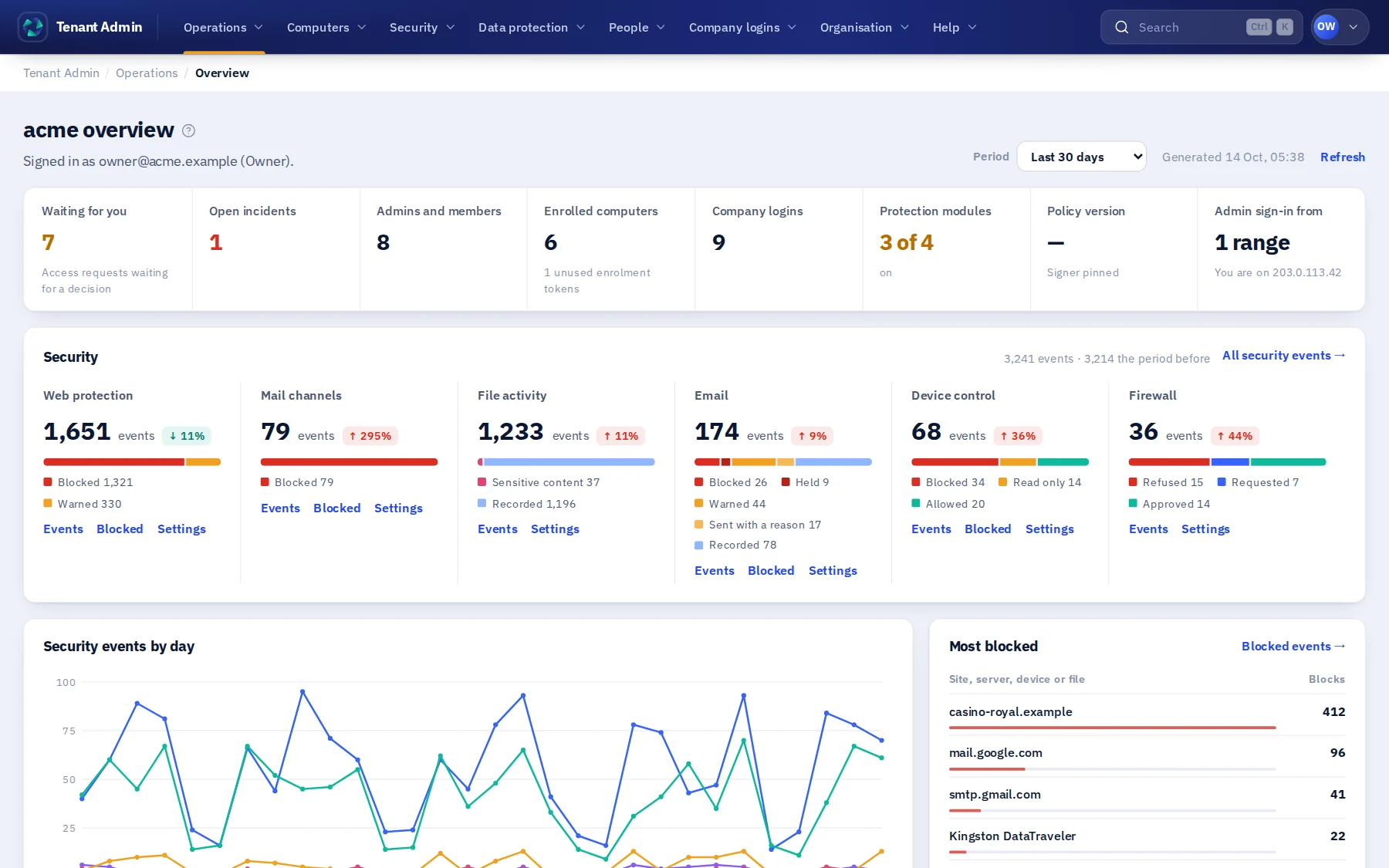
Trustwelt makes the computers your people work on trustworthy: set up once, protected on every site and in every application, reporting back, and using the company's logins without ever holding their passwords. Access is decided from the person, the computer and its current state.

Organisations start with a conversation. One person can start alone, free, on their own computer.

Managed computers in Tenant Admin: each computer with its person, platform, whether it is reporting, whether its web filter is on, and when it last reported.
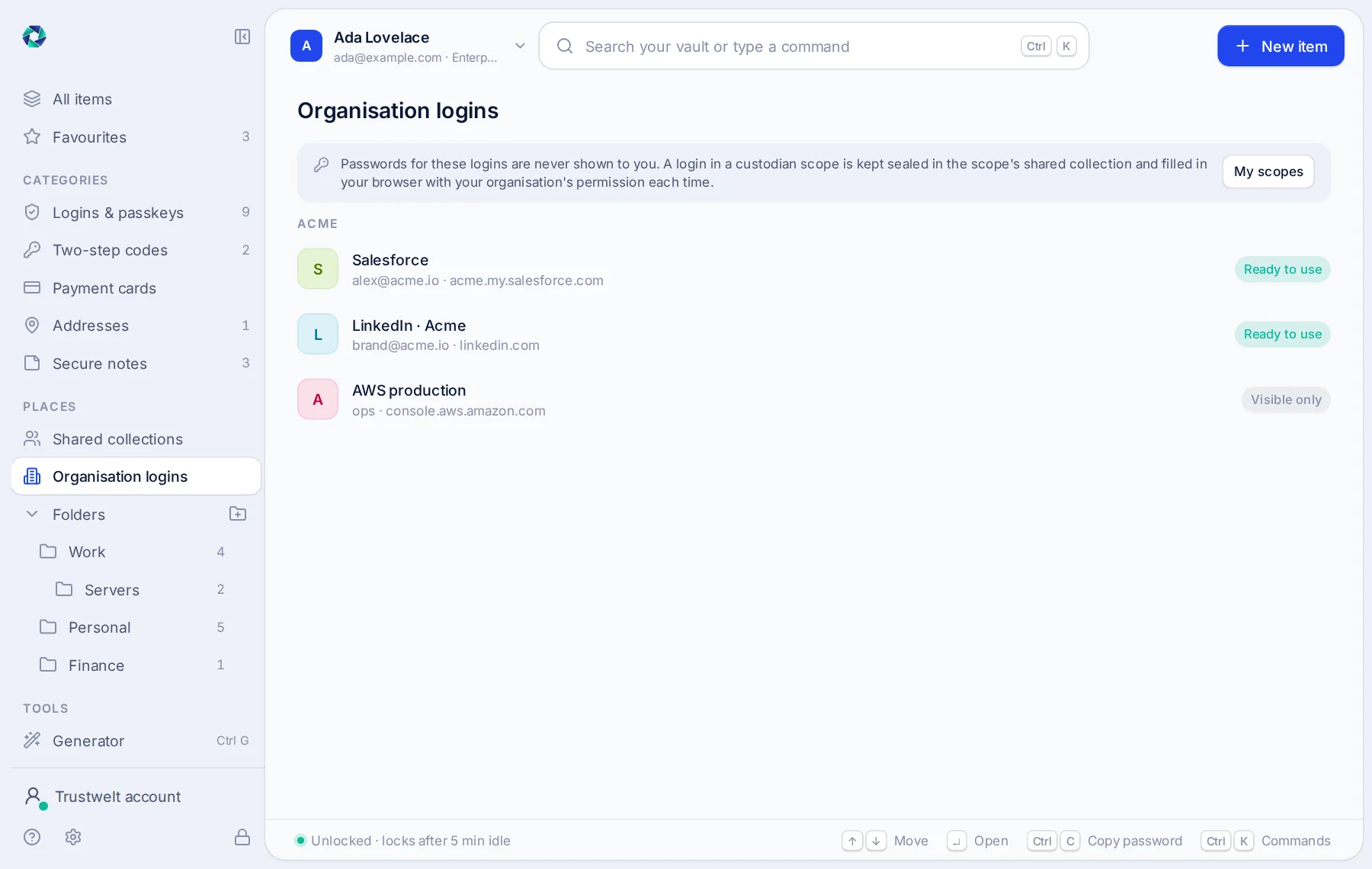
Organisation logins in Trustwelt Desktop: Salesforce and LinkedIn ready to use, AWS production visible only; no password is shown.

Product tour

What it is like to run.

Every screen below is the real product on sample data. No secret is ever shown, in the product or here.

Set a computer up once. It stays set up.

On a computer your organisation manages, a person types their master password once. From then on the browsers are connected, the rules apply, sync is on, and the computer reports in every few minutes. There is no Quit and no Sign out for the person; only the organisation ends it.

  • A computer that stops reporting shows as such, and you are told by e-mail.
  • Locking the screen hides the window; filling, sync and protection carry on.
  • Only an administrator of the computer can stop protection, deliberately, and that shows in your console.
About managed computers about Set a computer up once. It stays set up.
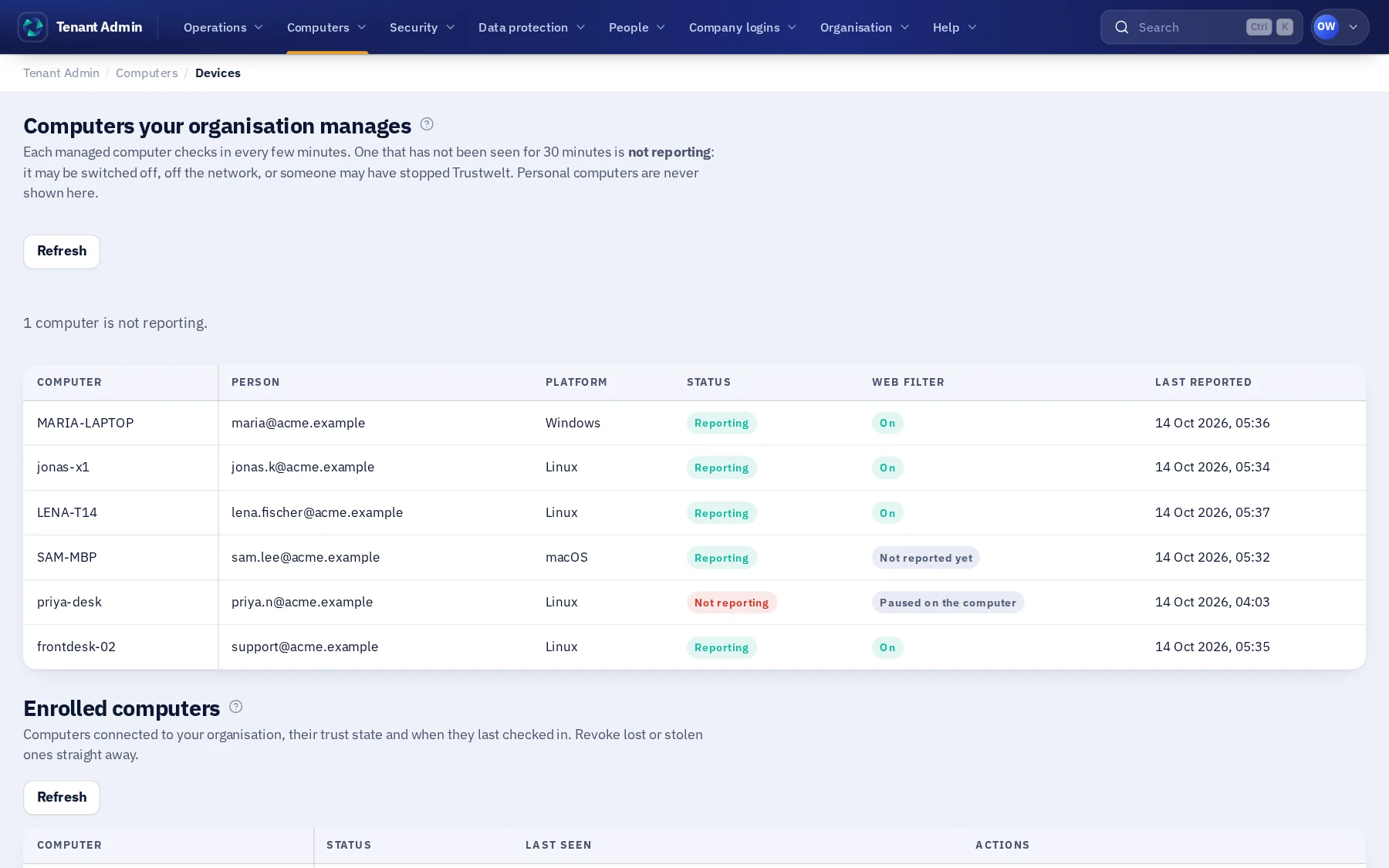
Managed computers in Tenant Admin: each computer with its person, platform, whether it is reporting, whether its web filter is on, and when it last reported; one is not reporting and its filter is paused.

Decide which sites work computers may open.

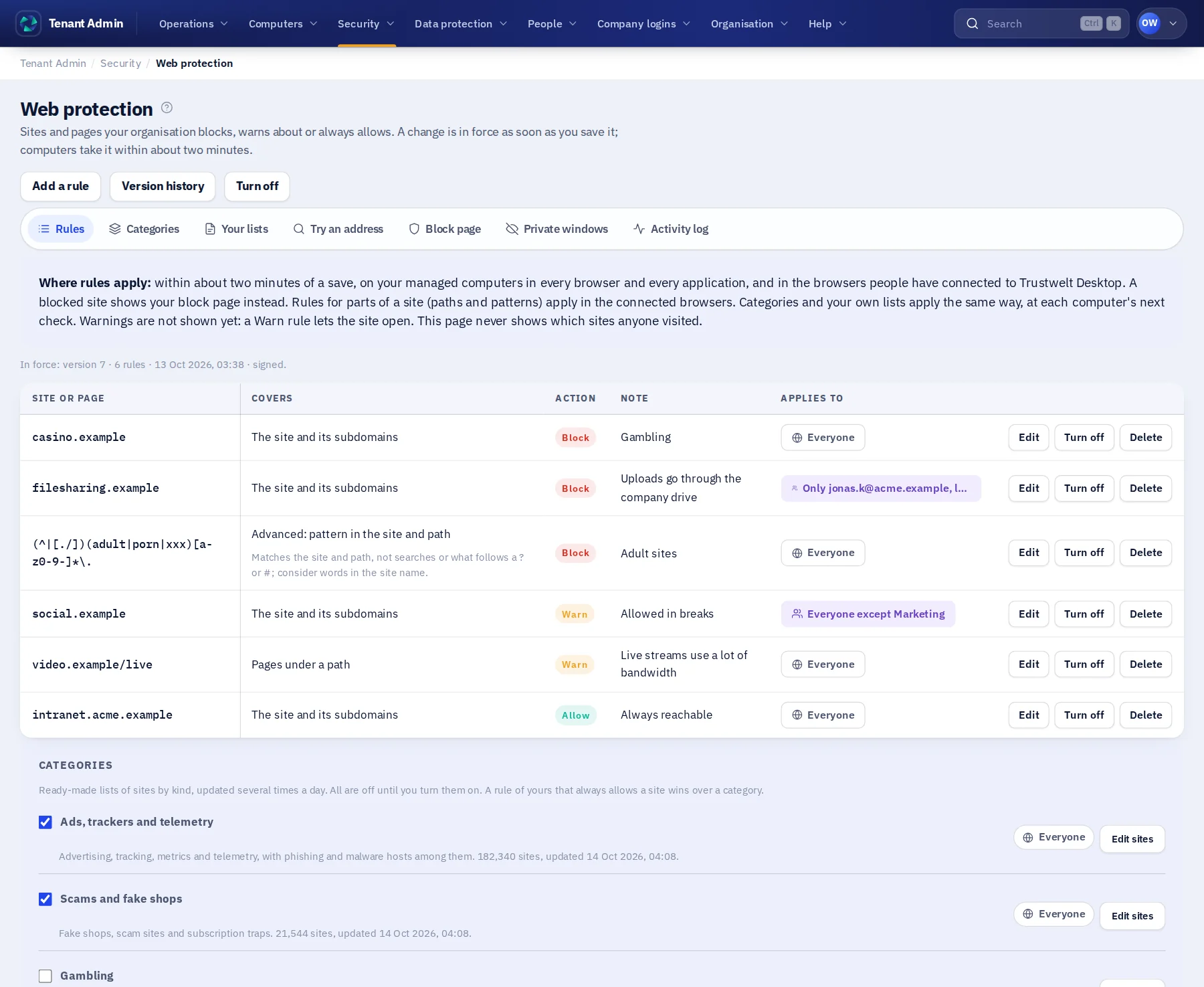
Write the rules in plain words: a site and everything under it, pages under a path, or any address that contains a word you name. Block, warn or allow, and try an address to see what they decide; a rule is in force as soon as you save it. On a managed computer the rules hold in every browser and every application, and a blocked site shows your organisation's own page.

  • A second browser, another application or a private window does not go around the rules.
  • A site with an expired, forged or untrusted certificate is stopped the same way, with the reason.
  • Blocks are on record with the rule and the computer; allowed browsing is not recorded unless you switch a full log on.
About web protection about Decide which sites work computers may open.
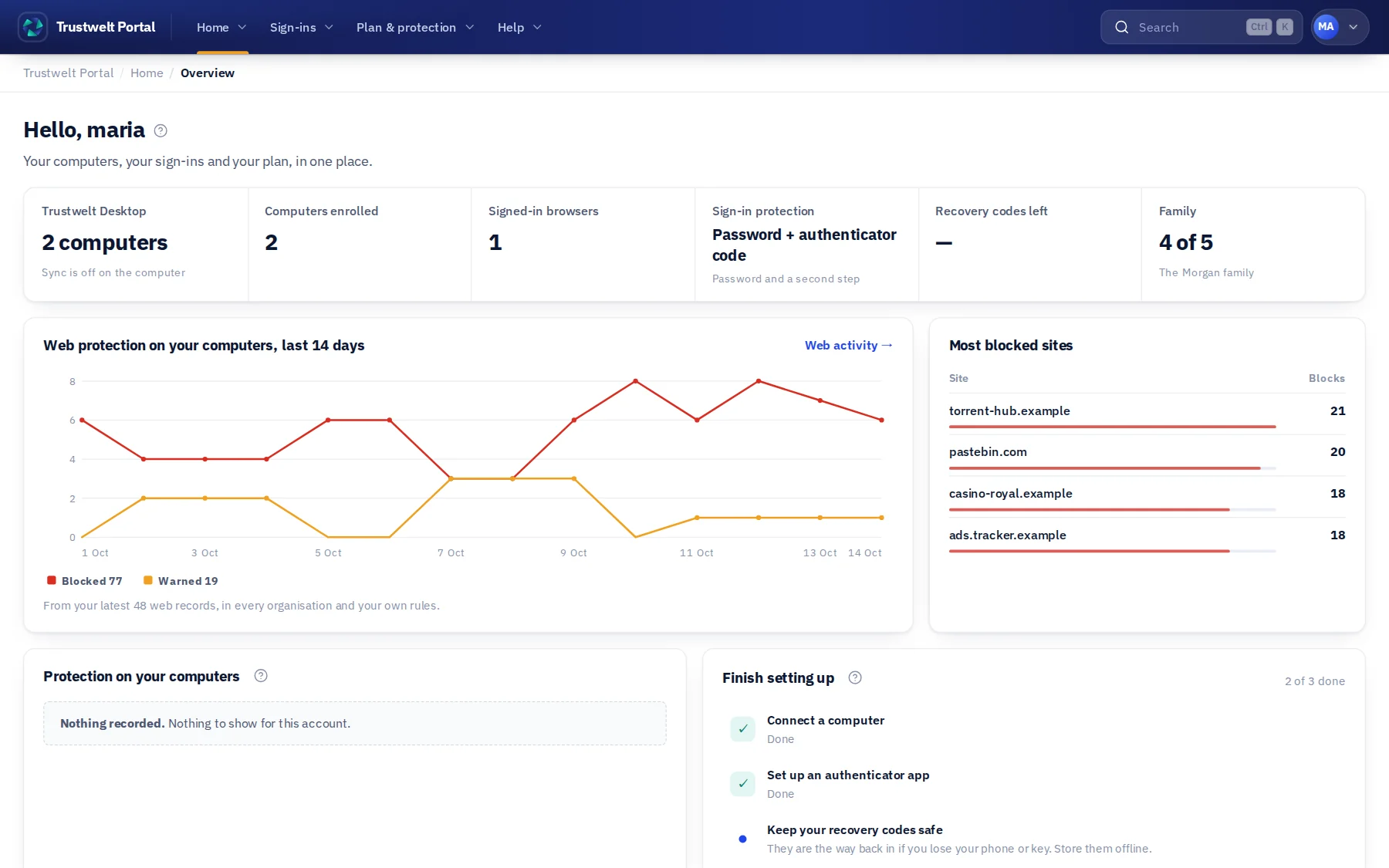
Web protection in Tenant Admin: block, warn and allow rules, a box to try an address, and the organisation's own block page as people will see it.

Share the use of a company login. Never the login.

Tenant Admin lists company logins by site and username, never by password. Grant their use to a person or a team. On their computer, Trustwelt Desktop fills the login on the right site under a one-time permission; the person never sees or copies the password, and every use is in your audit.

  • Leavers are out of every grant the moment they leave a group or the organisation.
  • Company cards are paid with but never read; every payment is recorded with its amount.
  • Access requests carry the reason people gave; you decide in the console.
About company logins about Share the use of a company login. Never the login.
Organisation logins in Trustwelt Desktop: Salesforce and LinkedIn ready to use, AWS production visible only; passwords are never shown or stored here.

Run your organisation from one console.

People and roles, admin areas delegated to HR, IT or finance, the access matrix that sets the most each role may do, and the usage audit. Sign in with your identity provider, send invitations through your own mail server.

  • Roles: owner, security admin, policy admin, auditor, support operator, member; plus admin areas with delegated authority.
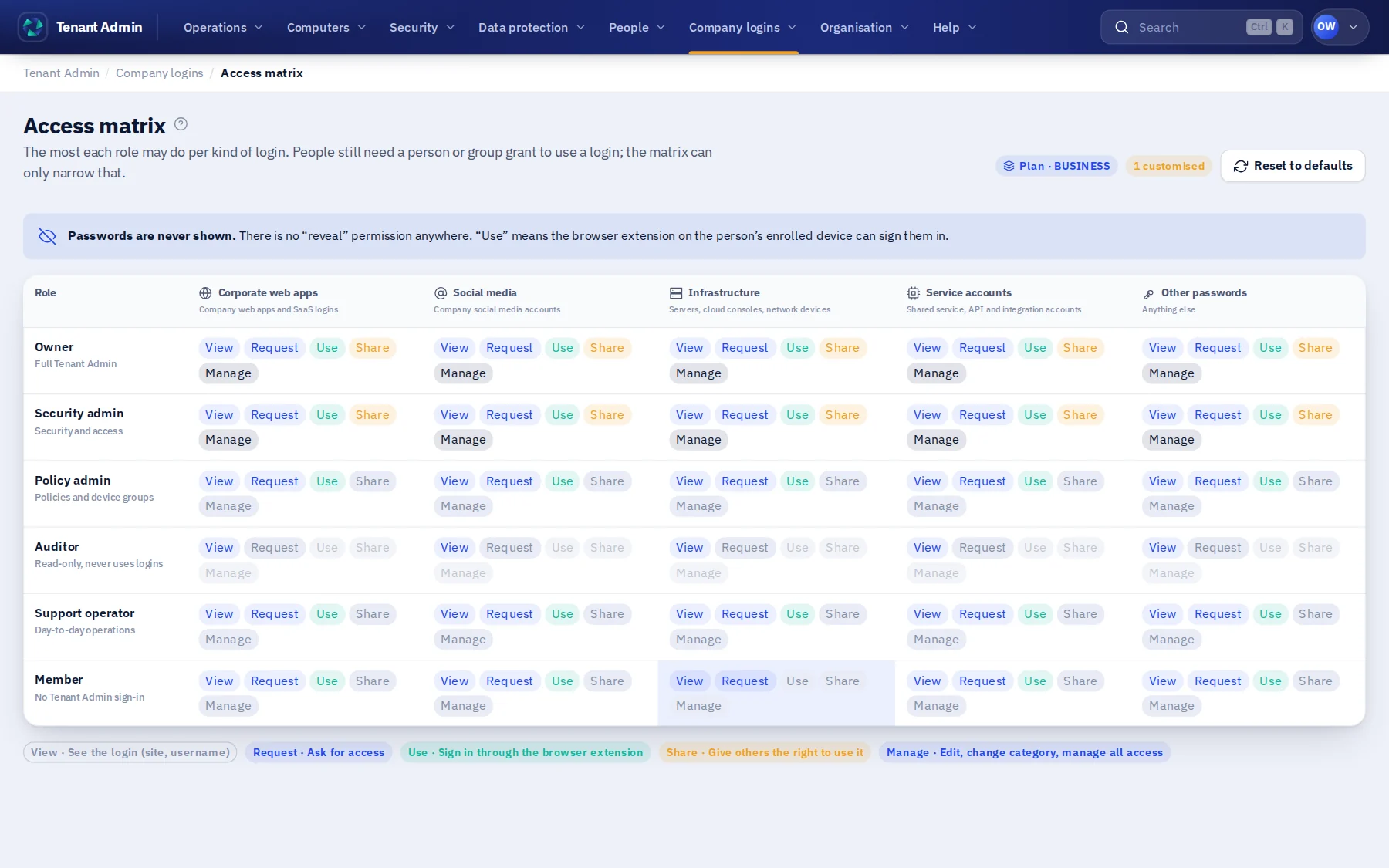
  • The access matrix: the most each role may do per kind of login, from viewing to managing.
  • Every privileged change, and every refused attempt at one, in a record nobody can quietly edit.
About Tenant Admin about Run your organisation from one console.
The Tenant Admin access matrix: rows for each role, columns for each kind of login, and in each cell which of View, Request, Use, Share and Manage is allowed.

Let finance hold the company cards.

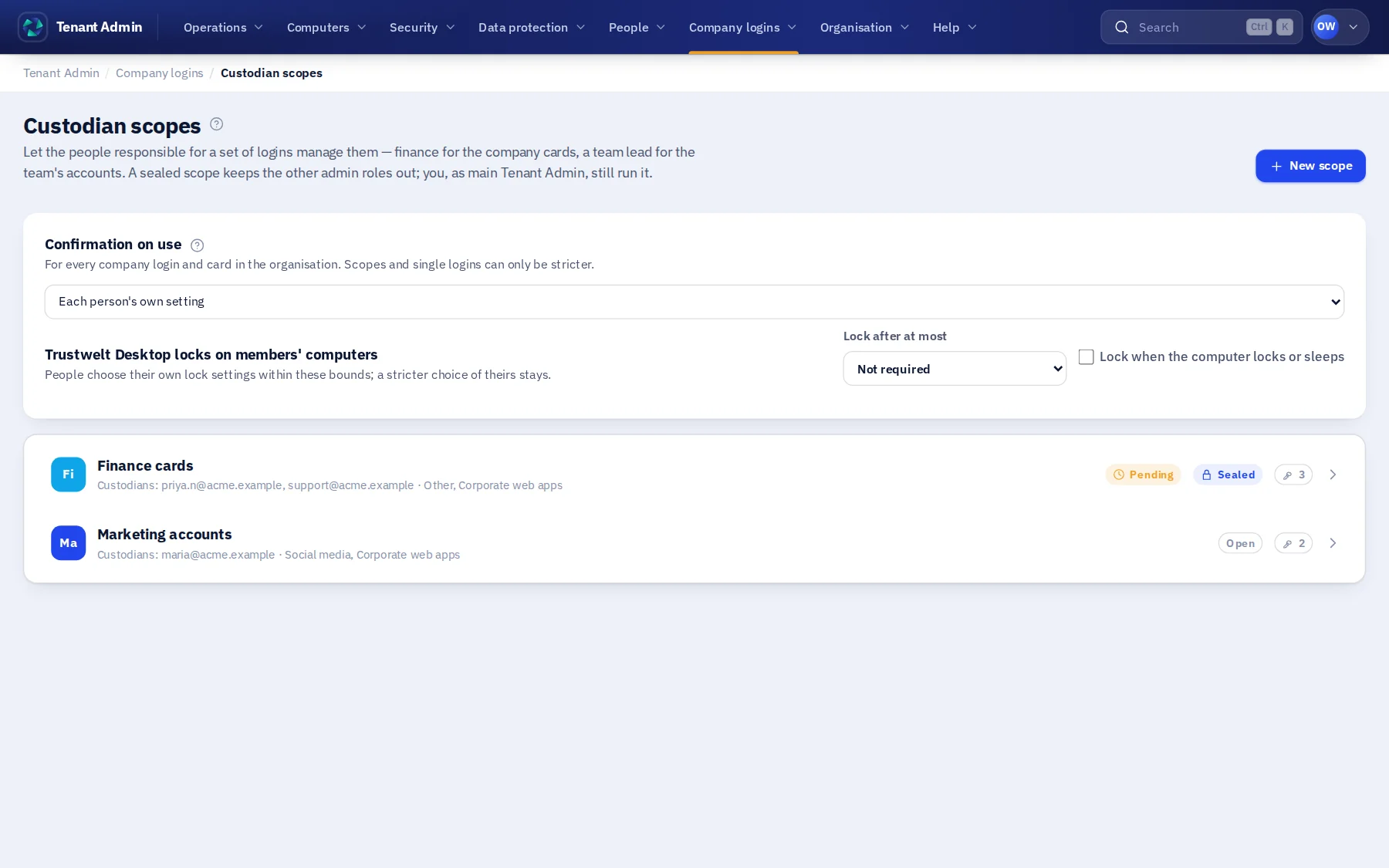
A custodian scope gives a set of logins or cards to the people responsible for them. Seal it, and every other admin sees only its name and a count. Changing its custodians needs a second custodian to agree.

  • Custodians add logins and cards and share their use with a team, from the Portal.
  • Members only ever get the use of an item, never its password or number.
  • The keys of a scope reach only the computers of its custodians and members.
About custodian scopes about Let finance hold the company cards.
Custodian scopes in Tenant Admin: Finance cards, sealed, with two custodians and a pending change; Marketing accounts, open, with one custodian.

Your people's own passwords stay their own.

The same app keeps each person's own logins, one-time codes, notes and cards in one encrypted file on their computer, opened with their master password. The organisation sees counts of personal activity at most: never a site, never an item. The vault inside is open source.

  • Argon2id and XChaCha20-Poly1305, with the whole file authenticated, titles and addresses included.
  • The browser extension fills logins, codes and cards on the page the person is on, and nowhere else.
  • Import from KeePass, Bitwarden, 1Password, LastPass, Chrome, Firefox, Safari and more, then clean up where it came from.
About Trustwelt Desktop about Your people's own passwords stay their own.
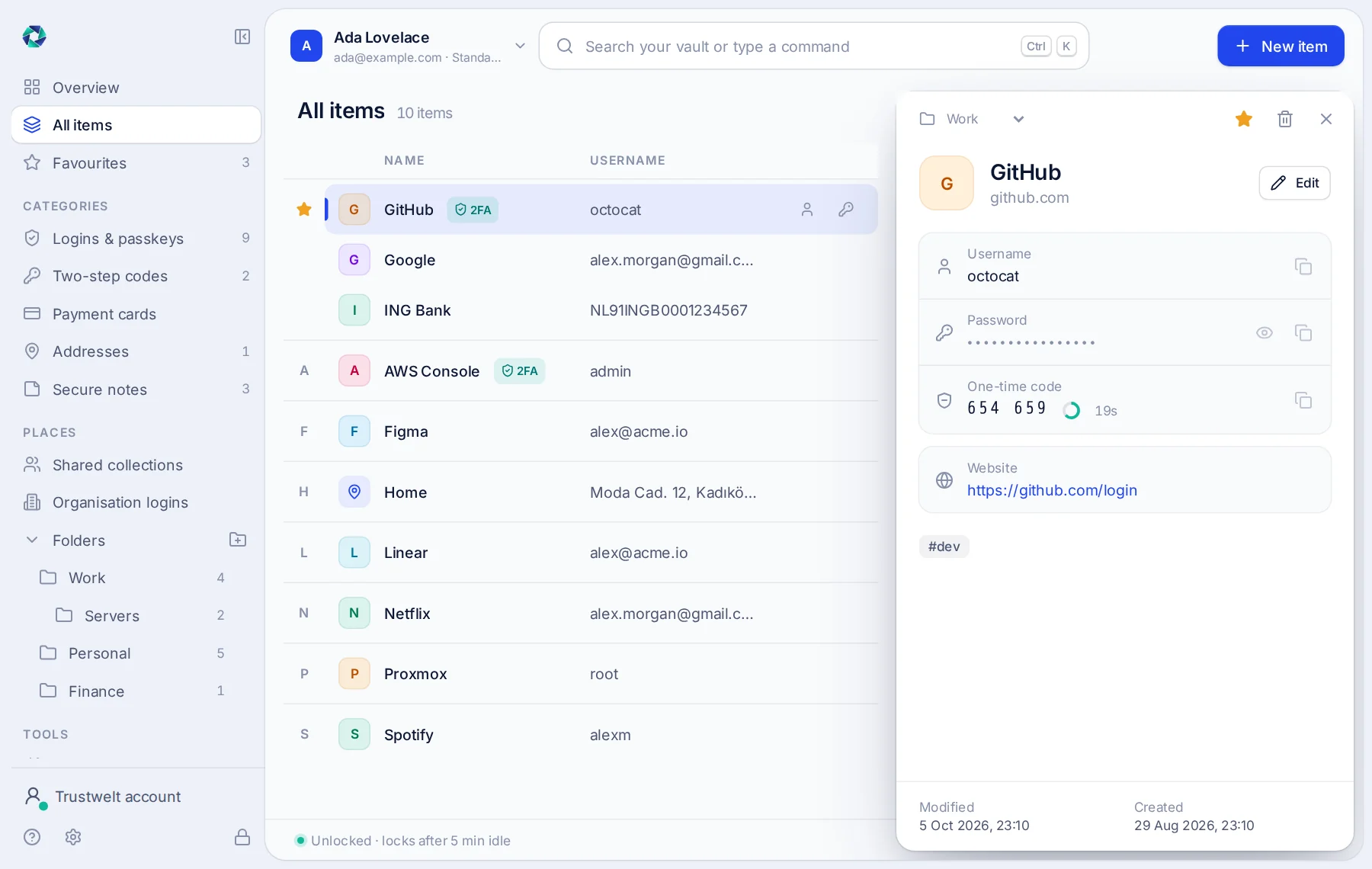
The Trustwelt Desktop window: a list of logins on the left and the GitHub login open on the right, its password hidden and a one-time code counting down.

The trust model

A login proves who. It does not prove what they sign in from.

Passwords get phished and second factors get approved by mistake. Trustwelt adds the computer and its state to every access decision.

  • IdentityWho is asking, verified with strong authentication.
  • DeviceWhich enrolled device they are on, proved cryptographically.
  • ContextThe device's current posture and how fresh that evidence is.
Identity, device and context feed one decision.Three inputs, identity, device and context, go into a server-side policy decision, which produces one of three outcomes: allow, remediate or restrict.Identitystrong sign-in, verifiedDeviceits own certificate and keyContextposture, evidence age, requestPolicyon the serverAllowaccess continues✓Remediatethe person is shown the fix!Restrictuntil the evidence changes✕
The decision is taken on the server and taken again whenever the evidence changes.

How it works

Identify. Assess. Decide. Enforce.

  1. Identify

    Bind the person to an enrolled device. The browser is never the authority.

  2. Assess

    Read typed posture from the device agent. Unknown stays unknown.

  3. Decide

    Policy names the outcome: allow, remediate or restrict. People set policy.

  4. Enforce

    Access follows the decision, and remediation shows how to get back to trusted.

Capabilities

One platform, from the first sign-in to the incident.

  • Managed computers

    A person types their master password once. From then on the computer is set up, protected and reporting, and none of it can be switched off from that chair.

    How it works about Managed computers
  • Web protection

    Decide which sites your organisation's computers may open, in plain rules. The rules hold in every browser and every application, and a blocked site shows your own page.

    How it works about Web protection
  • Company logins and cards

    Share the use of a login or a card without ever handing over the password or the number. Every use is recorded for your audit.

    How it works about Company logins and cards
  • Custodian scopes

    Finance holds the company cards, marketing holds the social accounts. Sealed scopes keep other admins out, and changes need two custodians.

    How it works about Custodian scopes
  • Device identity and posture

    Each enrolled computer has its own cryptographic identity and reports typed signals: disk encryption, firewall, secure boot. A signal that cannot be read stays unknown; it is never counted as compliant.

    How it works about Device identity and posture
  • Trust decisions

    Policy turns identity, device and context into allow, remediate or restrict, on the server, and again whenever the evidence changes.

    How it works about Trust decisions
  • Remediation and incidents

    Registered, signed actions help a computer become compliant again; there is no remote shell. Quarantine a computer, end its sessions, keep the evidence.

    How it works about Remediation and incidents
  • Trustwelt Desktop

    The app on every computer: your people's own passwords, codes and cards in an encrypted vault that stays theirs, and the connection to everything above.

    How it works about Trustwelt Desktop

Secure remediation

Don't just block access. Show how to become trusted again.

Remediation in Trustwelt is a short list of registered, signed actions sent to one device. It is not a remote shell, and it cannot run arbitrary commands.

Remediation is a list, not a terminal.Access is requested, a posture gap is found, the person is shown the fix, the device is checked again and policy decides. The only thing the platform can send is a typed, signed action bound to that one device.01Access requested02Gap found03Fix shownto the person04Device checkedagain05DecisionRegistered actiontyped · signed · allowlisted · one deviceno remote shell, no free-form command
The only thing the platform can send is a typed, signed action, bound to one device.

Security architecture

Security by architecture, not by promise.

  • Unknown ≠ trustedMissing evidence never counts as compliant.
  • MFA ≠ device trustA second factor proves the person, not the laptop.
  • No remote shellControl actions are typed, signed and allowlisted.
  • One tenant, one boundaryTenant scope comes from the server, never from the request.

Every rule above is enforced by the product, not by a promise, and the vault that holds your passwords is open source, so you can read how.

Secrets stay on the computer. Only ciphertext crosses.On the computer, the master password and the Secret Key go through Argon2id to derive the vault key, which encrypts the vault with XChaCha20-Poly1305. Across the boundary, only sealed envelopes travel to the Trustwelt cloud, which stores ciphertext, identifiers, versions and audit records, and never a key.Your computerMaster password + Secret Key128-bit key in the system key storeArgon2id512 MiB · about one secondVault keynever written to disk, never sentXChaCha20-Poly1305logins, codes, cards, notes · titles includedONLY CIPHERTEXT CROSSES9f3a·c1e07b·4d52d8·b9Trustwelt cloudSealed envelopeswrapped again at rest, AES-256-GCMIdentifiers, versions, sizesnever a title, a site or a secretIdentity, policy, device trustwhat the platform decides withAudit recordsappend-only, SHA-256 chained
The cloud stores what it cannot read: envelopes, identifiers, versions and sizes.
  • Argon2idyour vault key, derived on your computer
  • XChaCha20-Poly1305your vault, your sync envelopes, the browser channel
  • X25519 · Ed25519sharing with your family or team, your devices' identity
  • SHA-256 chainan audit your organisation can trust, that nobody can edit

Who it is for

Not enterprise-only.

The same security model for one person or ten thousand devices. Plans change what you administer, never how well you are protected.

Plans

For an organisation, a family, or one person.

Business and Enterprise run managed computers, web protection, company logins and the audit. Family covers a household; Standard one person, with their own web rules. The open-source desktop is free on its own. Encryption, two-step sign-in and device revocation are the same on every plan.

Open source

The vault on every computer is open source.

The part of Trustwelt Desktop that holds a person's own passwords is Vault Lite, free software under the GNU Affero General Public License. The vault format, the cryptography and the browser protocol are documented, and everything builds in a container so you can check a release yourself.

  • The desktop app, the vault service, the browser extension and the importers, in Rust and TypeScript.
  • A written file format specification and a threat model, next to the code.
  • Unit, process and end-to-end tests, including a real browser filling a real login.

Start with your organisation's computers.

Talk to us about your organisation, or start on your own computer with a free account.