
Trustwelt AI Security
Let your people, and their AI agents, work with AI. Keep the data where it belongs.
People paste a customer's complaint into ChatGPT to write a reply. Engineers start Claude Code or Codex in a repository that holds an AWS key. Trustwelt AI Security stands on the computer, in both places: it knows which AI services and agents are in use, lets you decide each one, checks what goes into them before it leaves, masks what must not go, keeps the keys in the vault, and writes a record. Trustwelt never reads the text.
Sold on its own, per person per month. Works alone or with the other Trustwelt products. Security Center included. Runs on: Managed computers with Trustwelt Desktop and its browser extension: the Chromium family and Firefox on Linux, Firefox on Windows; the AI agent gateway on managed Linux computers; other programs through the network filter, sites only.
What it does
Trustwelt AI Security, in plain words.
Trustwelt AI Security decides which AI services and AI agents people may use at work, and checks what goes into them on the computer: the text, the files and the agents' own calls.
- People
48 AI services, decided one by one
Chat assistants, translation, writing and transcription services in 4 categories, in a catalogue Trustwelt maintains. Block a category with one switch, or approve, restrict to a team or block each service; the rest stay open and checked.
- People
Paste, drop, upload, send: checked first
Held on the computer before the page gets it, read by validated detectors and your own lists, decided by your policy for that person, service and channel. A masked version may go; the original never does.
- People
A names model of Trustwelt's own
People's and organisations' names found by a small model running on the computer, signed by Trustwelt and off until you turn it on. The model detects; your policy decides.
- Agents
5 agents behind a gateway
Claude Code, Codex CLI, GitHub Copilot, Cursor, Gemini CLI: each tool call put into a risk tier and decided by your rules on the computer; questions answered in Trustwelt Desktop; secrets masked out of what the agent reads back.
- Agents
Model calls gated, keys in the vault
Only your providers and models; prompts and tool results pass the same detectors as a paste; the API key comes from the vault for the call and the agent never sees it; tokens and cost per call.
- Agents
A room, not the house
Started through Trustwelt, an agent writes one folder, reads the toolchains, and connects only through the gateway, which puts in the credential a destination needs and refuses the rest.
Modules
Everything in Trustwelt AI Security, each on its own page.
- Module
AI services and categories
About AI services and categories about AI services and categoriesThe AI and language services Trustwelt knows, each approved, restricted, blocked or left open.
- Module
What goes into AI services
About What goes into AI services about What goes into AI servicesWhat is pasted, dropped, uploaded or sent is checked on the computer before the site gets it.
- Module
Policies
About Policies about PoliciesWho may send what to which service: drafted, simulated, published, versioned.
- Module
Names of people and organisations
About Names of people and organisations about Names of people and organisationsA model on the computer finds names in the text; no name leaves for checking.
- Module
Held for review, and cases
About Held for review, and cases about Held for review, and casesA text a policy held waits for your answer; what needs a look becomes a case.
- Module
Coverage
About Coverage about CoveragePer computer: checked, checked less, or not seen. Counted apart, never added into a score.
- Module
The browsers' own AI, and extensions
About The browsers' own AI, and extensions about The browsers' own AI, and extensionsGemini, Copilot and Firefox's chatbot off by policy; the extensions installed, in one list.
- Module
AI agents on the computers
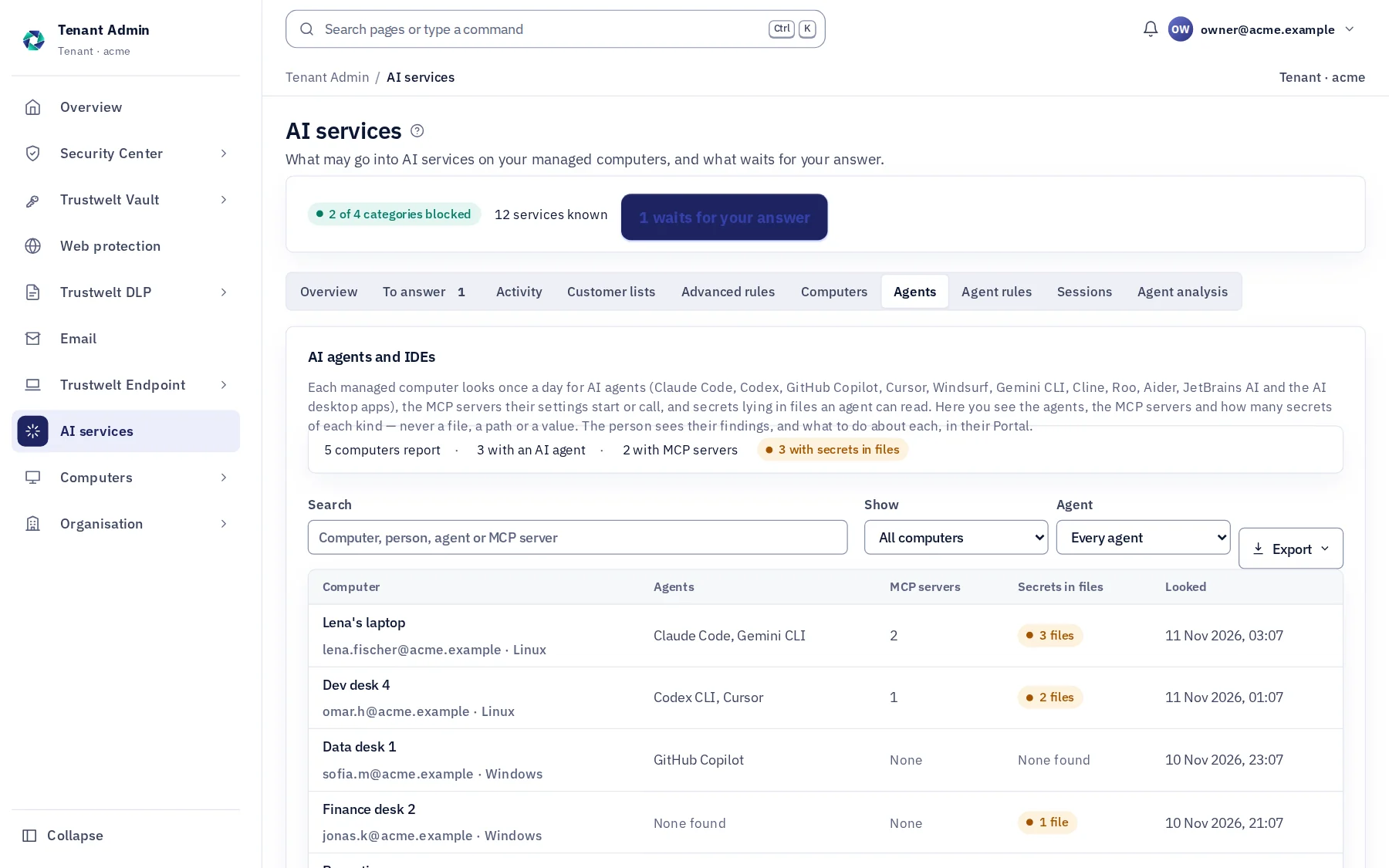
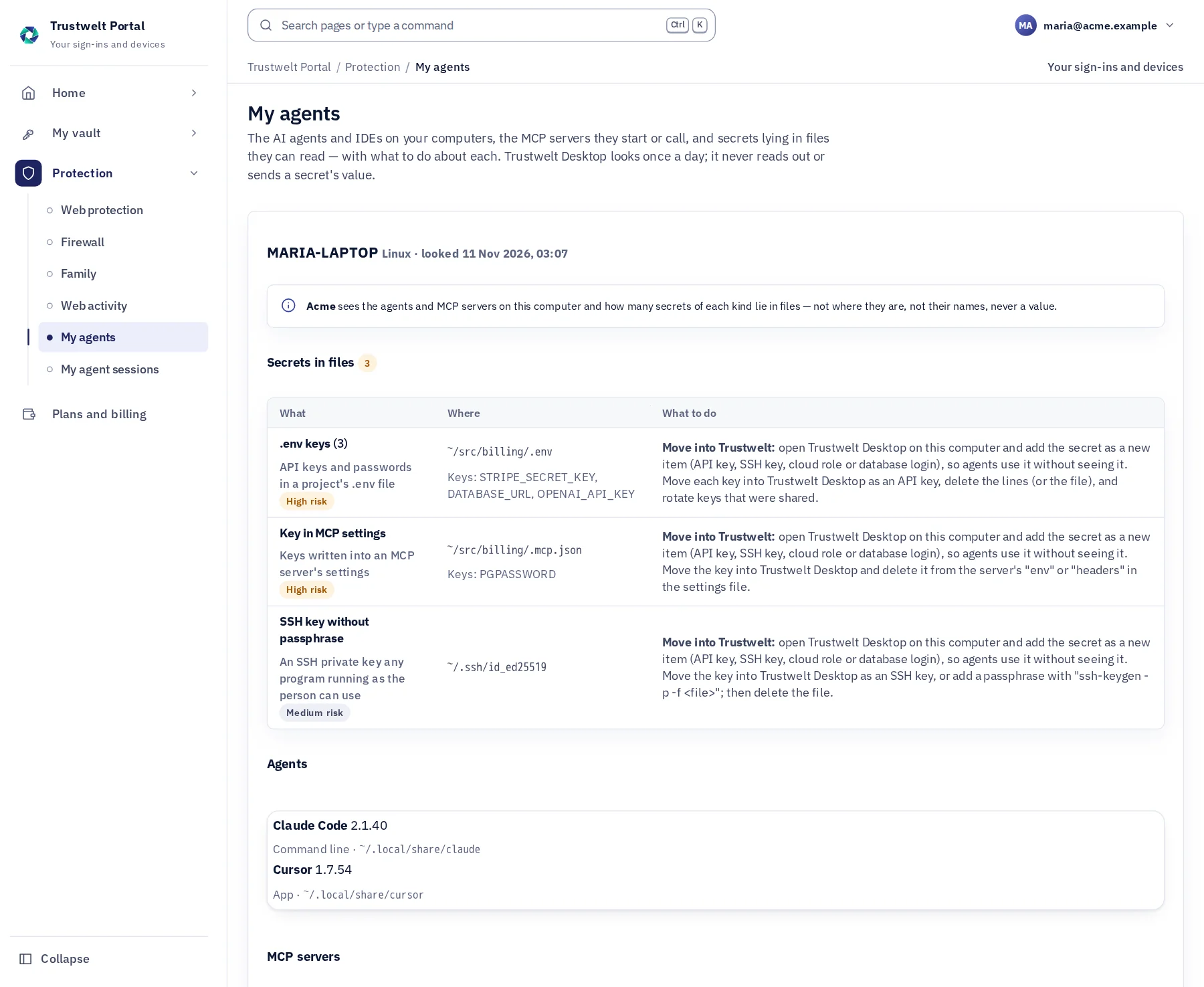
About AI agents on the computers about AI agents on the computersWhich agents and MCP servers each computer holds, and which keys lie in files they can read.
- Module
Agent gateway
About Agent gateway about Agent gatewayEach tool call of Claude Code, Codex, Copilot, Cursor and Gemini CLI decided on the computer: allow, ask or refuse.
- Module
Model gateway and keys
About Model gateway and keys about Model gateway and keysModel calls through a gateway on the computer: your providers, one data gate, keys the agent never sees.
- Module
Workspaces and network
About Workspaces and network about Workspaces and networkA confined agent writes one folder, reads the toolchains and connects only through Trustwelt.
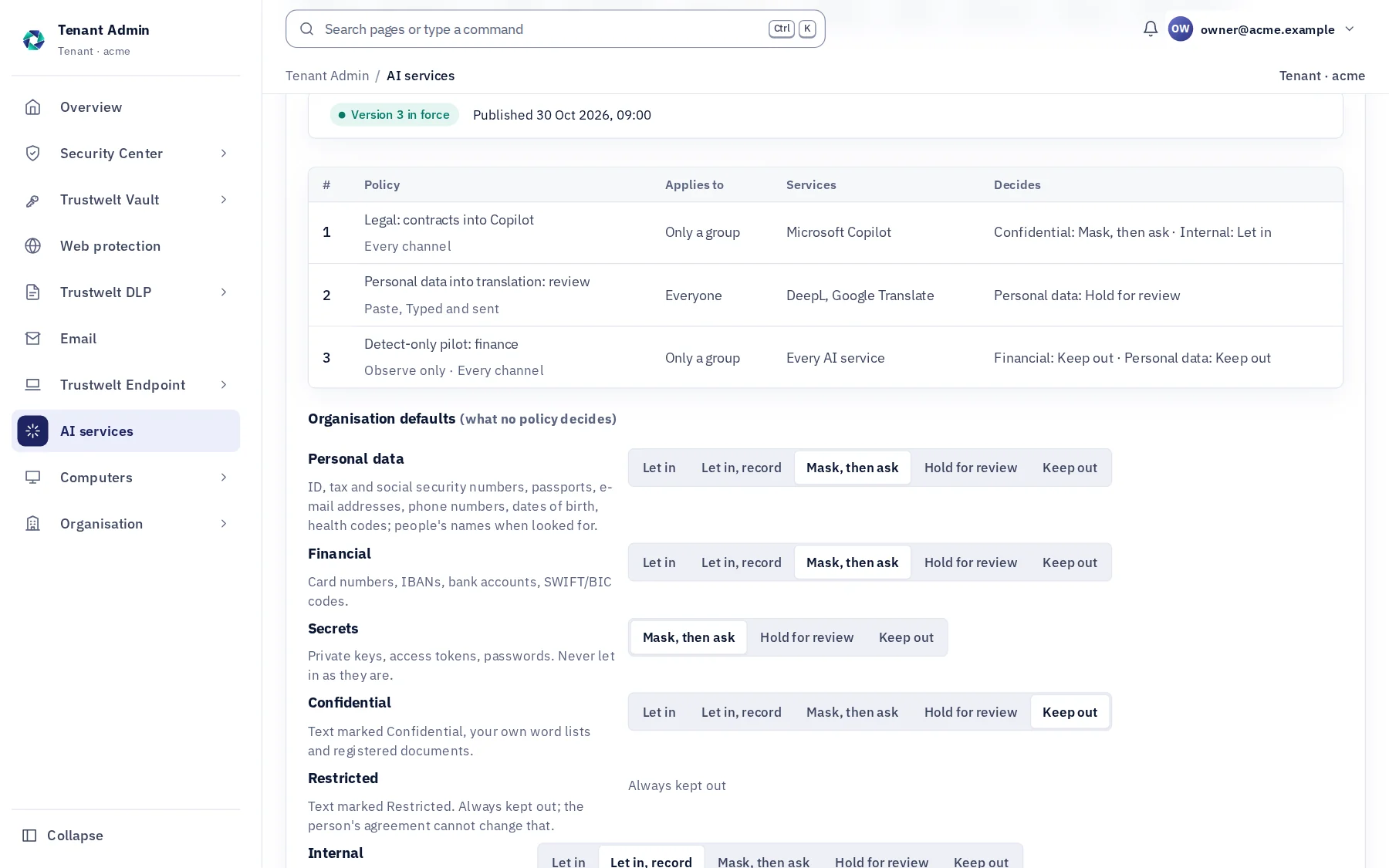
In Tenant Admin
What your administrators see.
What is recorded, and what never is
Your organisation sees this. Nothing else.
- ChecksThe site, how the text came in, the kinds of data found and how many, what happened, whether the page took it, and the policy and version that decided; a security event in Security Center and in your SIEM stream.
- Agent sessionsThe agent and its version, the workspace, each decision that was not a plain allow with its tier and rule, questions and answers, output masked, model calls with tokens and cost, connections by host, routine calls counted.
- DecisionsEach service's decision, each policy and agent-rule version, each answer to a held text and each case step, with who and when, in the audit log.
- CoveragePer computer: the Desktop version, the browsers connected and their extension, the names model installed, the agents found, and whether each agent's managed settings are in place.
Never:
- The text, the file, the prompt or the message: every check runs on the computer, and only a record leaves it.
- The original after a person agrees to a masked version: agreement never overrides a policy.
- A key in an agent's reach: it is put into the request on the computer by the gateway, held in memory for the call, and wiped.
- A check on a person's own, unmanaged computer by the organisation: there the person is the gateway's administrator.
- A vendor's whole domain blocked for one of its services.
Half one: people and AI services
What happens to a paste.
The person pastes, drops, uploads or presses Enter. The text is held on their computer and goes through these steps in a few milliseconds; the page sees nothing until the end.
Write a reply to PERSON_1 about his refund. His card is CARD_NUMBER_1, the account IBAN_1. He wants it by Friday.
Held on this computer · a name, a card number and an account number masked
- Your organisation sees
- one record
- Service
- ChatGPT
- How it came in
- Typed and sent
- Found
- Name 1 · Card 1 · IBAN 1
- Decision
- Masked, then sent
- Policy
- Organisation default, version 12
- The text
- Stays on the computer
Held
The Trustwelt extension stops the paste, drop, file or message before the page gets it and hands it to Trustwelt Desktop on the same computer.
Found
Validated detectors read it: cards, bank accounts, identity numbers, secrets, markings, source code, your word lists and registered customer lists; the names model, when on, finds people and organisations.
Encodings read
A value written in base64, hex, percent escapes, Unicode escapes or entities is read and can never be masked, so it keeps the text out. Text that may hide a value is read again by a confined worker.
Masked in place
Each value becomes a stand-in such as CARD_NUMBER_1 in the text as typed, tabs and line breaks kept. The masked text is checked again before it is offered.
Decided by your policy
Let in, recorded, masked then asked, held for your review, or kept out, per class of data, for that person, service and channel. Restricted is always kept out; a secret never goes in as it is.
Recorded, without the text
The service, the channel, the kinds found and how many, what happened and the policy that decided. In Security Center, in your reports and in your SIEM stream.
Also in half one
Files, pictures, names, and fewer false alarms.
- Files
Plain text masked, documents read, pictures sent as they are
A .txt, .csv, .md, .json or .log file goes as a masked copy of the same name. Word, Excel and PDF files are read on the computer for values and names; one with something to mask is kept out. Pictures go into AI services as they are, by the organisation owner's decision.
- Names
A person's name is personal data; an organisation's is internal
Trustwelt's own small model finds names on the computer, off until you turn it on, downloaded once and checked against its signature. Each word takes the model's most likely label; there is no score threshold to tune.
- Fewer false alarms
Quoted text skipped, capitals not names
Text a person puts between triple quotes goes in as written, on their own word: they are told each time, and the administrators see the whole text. Words written in capitals are not names. Both are on by default, each with exceptions per person or group.
- Customer lists
Exact values, not look-alikes
Register a customer list once; its account numbers and identifiers are found by exact match, hashed, on the computer. Source code is a kind of data of its own, with its own action in your policies.
- Policies
Drafted, simulated, piloted, published, rolled back
Ordered policies for people and groups, services and channels, an action per class. Observe before you enforce. A simulator that keeps no text. Every version kept; a pilot group first; any earlier version published again.
- Review and cases
A human answer when it matters
A policy can hold a text for your answer: approve for an hour, a day or a week, or refuse with words the person reads. Records that need a look become cases with a status, a log and an export that stands as evidence.
- Consent never overrides policyThe person may agree to a masked version, never to the original.
- Fail closedA text that cannot be read in full is kept out, whatever the classes say; a computer without the names model keeps names-checked text out until the model is there.
- The model detects, the policy decidesNo threshold, no score: the detectors and the names model say what they found, and your published policy says what happens.
- Coverage is not a scoreEach computer is checked, checked less or not seen, with the reason; the three are never added together, and the page warns when too few are fully checked.
The class table
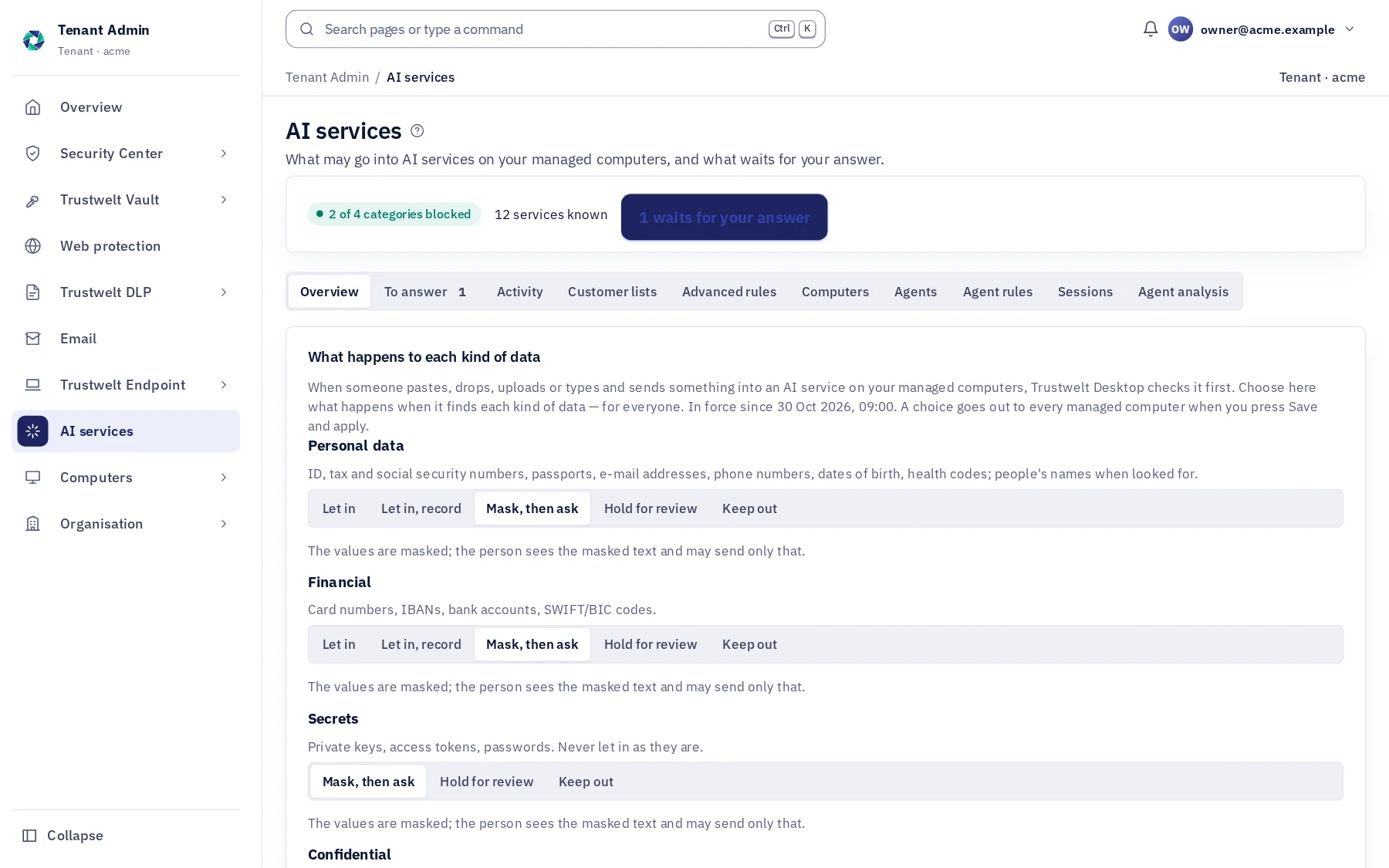
Six classes of data, one action each. These are the defaults a new organisation starts from.
| Class | What falls into it | Default | Can be set to |
|---|---|---|---|
| Personal data | Identity numbers, passports, e-mail addresses, phone numbers, dates of birth, health codes, people's names (with the names model on) | Masked, then asked | Let in · recorded · masked then asked · held for review · kept out |
| Financial | Payment cards that pass their check digit, IBANs and bank accounts | Masked, then asked | Let in · recorded · masked then asked · held for review · kept out |
| Secrets | Private keys, API tokens, passwords, sharing links | Masked, then asked | Recorded · masked then asked · held for review · kept out; never let in as it is |
| Confidential | Your word lists and markings, registered customer lists, registered documents, source code where you class it so | Kept out | Let in · recorded · masked then asked · held for review · kept out |
| Internal | Organisations' names (with the names model on), terms you class as internal | Let in and recorded | Let in · recorded · masked then asked · held for review · kept out |
| Restricted | Restricted markings and lists you class as restricted | Kept out | Always kept out. No policy, no person and no exception changes it. |
The most restrictive class found decides. A policy names people or groups, services and channels, and sets an action per class; the first policy that decides a class wins, and the organisation defaults stand behind every policy.
Half two: AI agents and IDE assistants
Agents get a room, never the keys.
An AI agent runs as the person, with the person's files, keys and network. Trustwelt puts a gateway on the computer between the agent and everything it reaches: each tool call decided, each model call checked, each key kept in the vault, each connection routed. The agent still works; it just cannot take what it was not given.
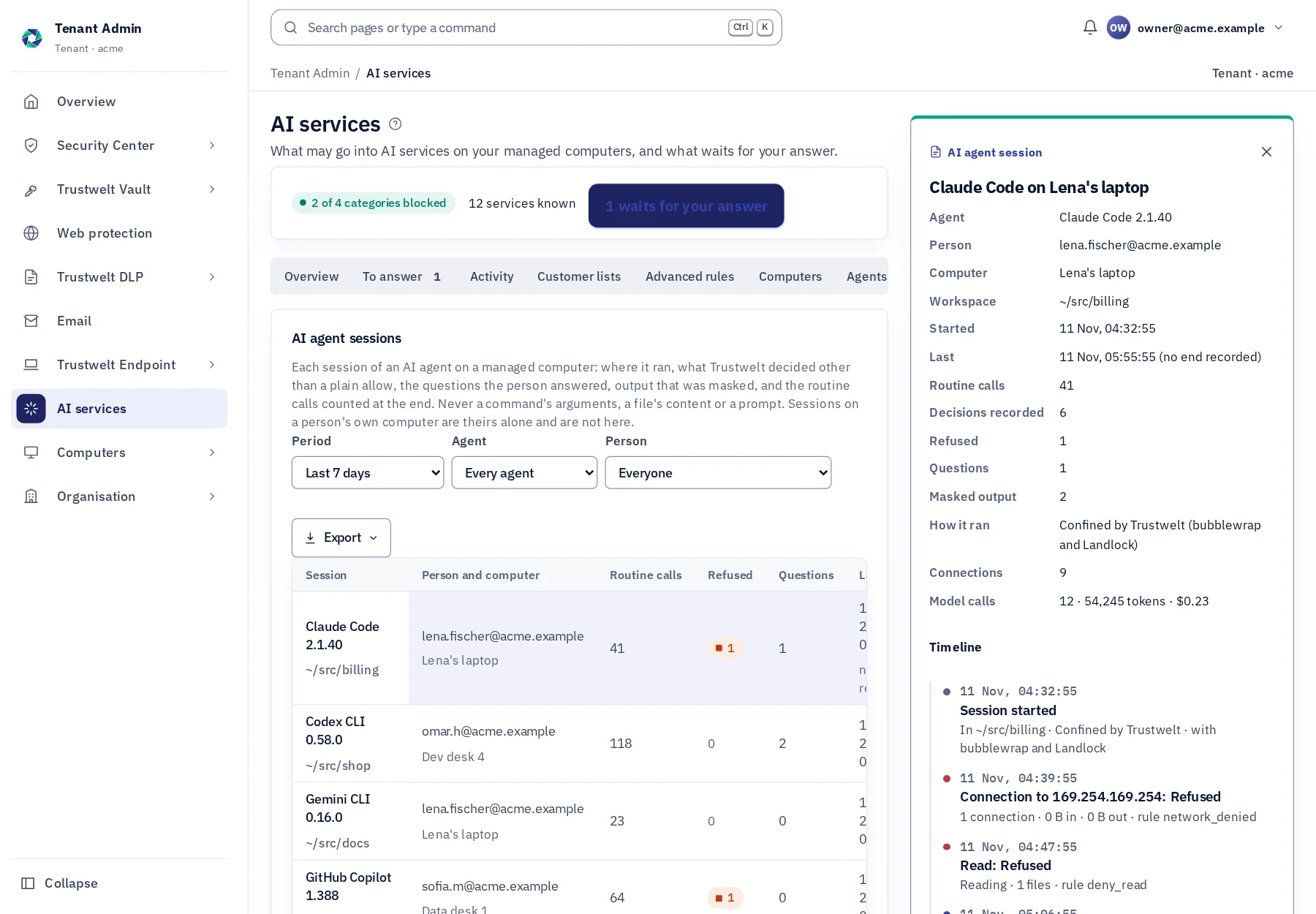
- sessionClaude Code in ~/src/billingconfined · bubblewrap + Landlock
- Read~/.ssh/id_ed25519refused · folder rule
- Bashnpm testallowed · recorded
- modelclaude-sonnet-4-5 via Trustwelt2 values masked · key from the vault
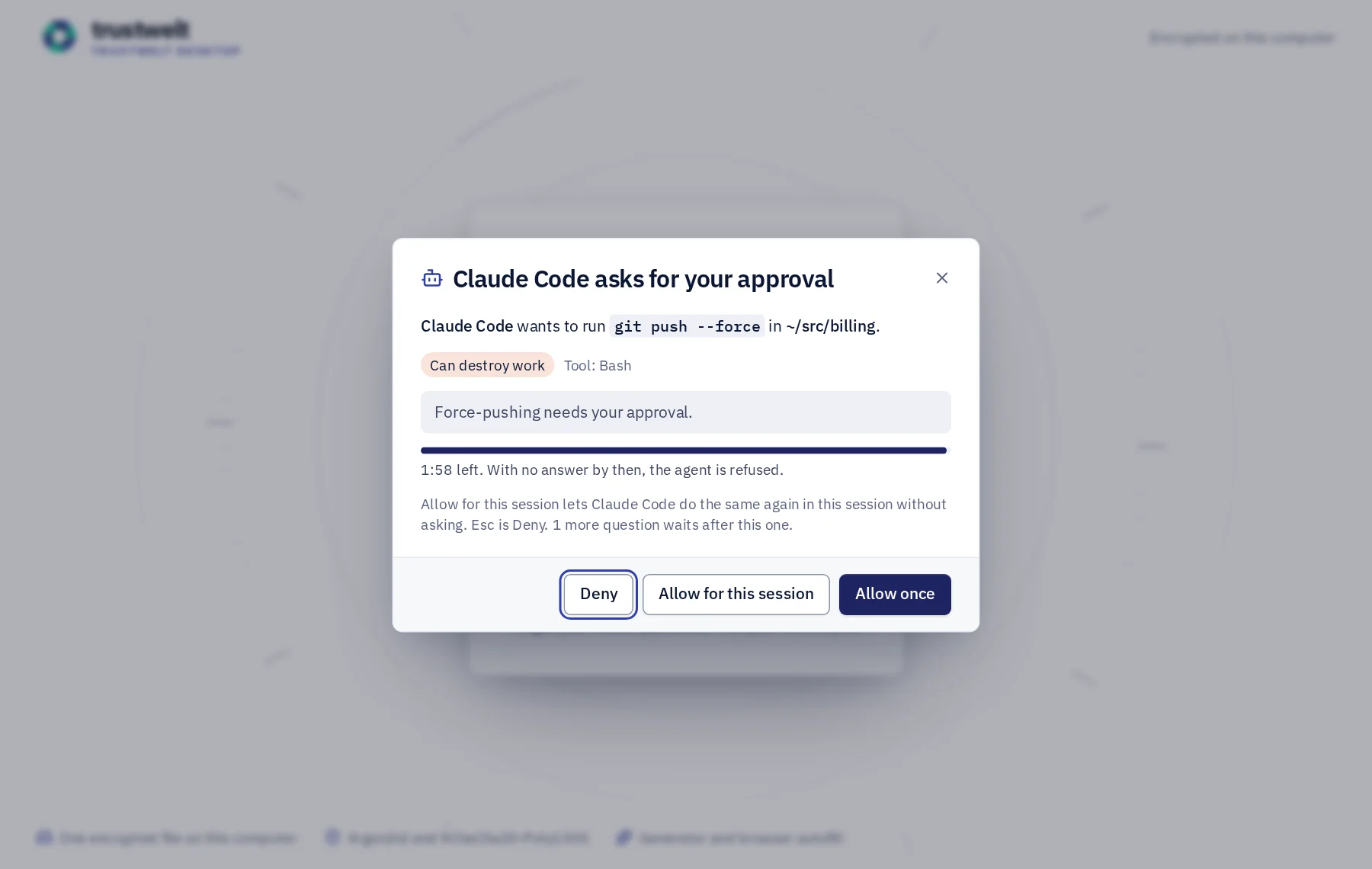
- Bashgit push --forceasks you in Trustwelt Desktop
- sshdeploy@prod-1signed in the vault · key never handed over
- Discovery
Which agents, which MCP servers, which keys in files
About the agent inventory about Which agents, which MCP servers, which keys in filesEach managed computer looks once a day for 12 agents and apps, the MCP servers their settings name, and 13 kinds of secret lying in files. The organisation sees counts; the person sees each finding and how to move it into Trustwelt.
- Gateway
Every tool call decided on the computer
About the agent gateway about Every tool call decided on the computerRead, write, execute, destructive, exfiltration. Rules first match first; folders no rule can open; questions answered in Trustwelt Desktop; unknown agents recorded or refused; secrets masked out of tool output.
- Models and keys
Model calls through Trustwelt, keys from the vault
About the model gateway about Model calls through Trustwelt, keys from the vaultOnly your providers and models. Prompts and tool results pass the same detectors as a paste. Prompt-injection phrases stripped. The key put in on the computer and wiped; tokens and cost per call, person, group and model.
- Workspaces and network
One folder to write, one way out
About workspaces and network about One folder to write, one way outStarted through Trustwelt, the agent runs in bubblewrap and Landlock: the workspace writable, the toolchains readable, connections by category and host, credentials put in per destination, cloud metadata refused.
- SSH and MCP
Keys the vault signs, servers the gateway starts
About company servers about Keys the vault signs, servers the gateway startsGit and ssh get an SSH agent of Trustwelt's whose keys never leave the vault service. MCP servers start through Trustwelt's MCP gateway; a tool whose description changed since you approved it is held.
- Two views
Tenant Admin and the person's Portal
Agents, Agent rules, Sessions and Agent analysis for the organisation; My agents and My agent sessions for the person, with their own rules for their own computers. A session on a company computer shows in both; one on a person's own computer only to them.
- Claude Code
- Codex CLI
- GitHub Copilot
- Cursor
- Gemini CLI
The agent rules
What a new organisation starts from. Every line is yours to change, with exceptions per person or group.
| Tier | What counts | Default |
|---|---|---|
| Read | Reading files, searching, fetching web pages | Allowed |
| Write | Writing and editing files in the folder the agent was started in | Allowed |
| Execute | Shell commands and MCP tools not classified otherwise | Allowed and recorded |
| Destructive | rm -rf, git push --force, git reset --hard, terraform apply or destroy, kubectl delete, DROP TABLE, mkfs, dd, a pipe from curl into a shell, a write outside the workspace | Asks the person |
| Exfiltration | Uploads with curl, scp or rsync to another host, gh gist create | Asks the person |
| Destination | Examples | Default |
|---|---|---|
| Model providers | Anthropic, OpenAI, Google, Azure OpenAI; through the model gateway | Allowed |
| Git hosts | GitHub, GitLab and the hosts you name; a credential put in where you say | Allowed |
| Package registries | npm, PyPI, crates.io, Maven and the like | Allowed and recorded |
| Cloud APIs | AWS, Google Cloud, Azure endpoints | Asks the person |
| Internal hosts | Your private address ranges and the names you list | Allowed |
| Everything else | Any host not named above | Allowed and recorded |
| Cloud metadata | 169.254.169.254 and its kin | Refused, whatever the rules say |
Folders no rule opens
An agent's file tools may not read these, whatever a rule says; a confined agent cannot reach them at all.
- ~/.ssh
- ~/.aws
- ~/.config/gcloud
- ~/.kube
- ~/.gnupg
- browser profiles
- the vault
- other agents' credential files
Files an agent may not change
Its own settings, hooks and MCP configuration, and the repository's hooks: changed only through the gateway, so a rule cannot be edited away by the agent it binds.
- .claude/
- .mcp.json
- .vscode/settings.json
- .cursor/
- .git/hooks
- .git/config
In the words people read
Every refusal says why, in a sentence you can change.
A security product that refuses in silence teaches people to go around it. Trustwelt names the rule and the reason, in the words the organisation wrote, where the person is: in the page, in the agent's own output, in Trustwelt Desktop.
- In the page
A paste, masked
"A name, a card number and an account number were masked. You can send the masked version, or send nothing." The person sees the text exactly as it would go, and the two buttons.
- In the page
A text held for review
"Held for your organisation's answer." The administrator approves for an hour, a day or a week, or refuses with a sentence; the person reads the answer in Trustwelt Desktop.
- In Trustwelt Desktop
An agent asks
"Claude Code wants to run git push --force in ~/src/billing. Can destroy work. Force-pushing needs your approval." Deny, Allow once, Allow for this session; with no answer in time, the agent is refused.
- In the agent's output
A tool held
"Trustwelt holds the tool create_issue: its description changed since your organisation approved it." The MCP server never sees the call; the organisation approves the new description in Agent rules.
- In the agent's output
Trustwelt Desktop not running
"Trustwelt Desktop is not running." Reads go on; anything above a read is refused until it is, and the miss is on record in Tenant Admin.
- In the page
The names model not yet there
"The check for people's names is not ready on this computer yet." A text that needs the names check is kept out until the model has arrived; Coverage shows the computer as checked less, with this reason.
Who sees what
Three parties, one table.
| Event | The person | The organisation | Trustwelt |
|---|---|---|---|
| A paste into an AI service | The masked text, the reason, the two buttons; later, in their Portal, what the organisation can see of them | The service, the channel, the kinds found and how many, the decision, the policy and version; in Security Center and the SIEM stream | The same record as the organisation, to run the service. Never the text. |
| A file dropped or uploaded | Whether it went, went as a masked copy, or was kept out, and why | The file's name and size, the kinds found and how many, the decision | The same record. Never the file. |
| An agent's tool call | The decision in the agent's output; a question in Trustwelt Desktop; the session in their Portal | The tool, the kind of command in two words, the tier, the rule, the decision, who answered | The same record. Never a command's arguments or a file's content. |
| An agent's model call | Masked values in the agent's own output when the gate masked; tokens and cost in their Portal | Provider, model, tokens, cost, the kinds found, the decision, per person, group, agent and model | The same figures. Never the prompt or the answer. |
| A key used for an agent | The key question when the item's rule asks; each use in the vault's own activity log | That an item was used for a provider or host, by which agent, in which workspace | Nothing of the key: it lives in the vault on the computer. |
| The daily look for agents and secrets | Each agent, MCP server and secret file, with its path, key names and the step to take | Agents, MCP servers and counts of secrets by kind, per computer | The same counts. Never a path or a value. |
| A person's own computer | Everything, and the rules, as the gateway's administrator | Nothing, unless the person chose Show in my Portal for the inventory | Nothing beyond what the person chose to keep in their Portal. |
Alone or together
Each product stands on its own. Together they share what they know.
- Trustwelt DLP: the same detectors, word lists, registered lists and classes decide what is sensitive in a file leaving the computer, in a text going into an AI service and in an agent's prompt.
- Trustwelt Vault: API keys, SSH keys, cloud roles and model keys live in the vault with an agent-use rule; company servers' keys are signed there for people and agents alike.
- Trustwelt Web Protection: a blocked or restricted AI service is blocked through Web Protection's filter and shows your block page; a site you always allow wins.
- Trustwelt Endpoint: browser security holds the browser's password manager, autofill and sync; AI Security holds the browser's own assistants, translation and spelling.
- Trustwelt Secure MailGW: what may not go into an AI service may not go out by mail either: one set of detectors, two doors.
- Security Center (included): the events, reports and exports of every product you hold, in one place; each PDF stands as evidence with the time to the second and its SHA-256. Weekly or monthly reports made by Trustwelt itself and kept in a library, a breakdown by two dimensions with saved views, and a signed stream of events to your SIEM.
Specification
Where it runs and what it needs.
- Runs on
- Managed computers with Trustwelt Desktop and the Trustwelt browser extension: the Chromium family and Firefox on Linux, Firefox on Windows. The agent gateway, model gateway and confinement on managed Linux computers. Other programs where the network filter runs, sites only.
- AI services
- 48 in 4 categories, each entry naming only the sites that serve the service itself; your own services added by site.
- Agents
- Governed by the gateway: Claude Code, Codex CLI, GitHub Copilot, Cursor, Gemini CLI. Found by the daily look: Claude Code, Codex CLI, GitHub Copilot, Cursor, Windsurf, Gemini CLI, Cline, Roo Code, Aider, JetBrains AI and Junie, Claude Desktop, ChatGPT desktop.
- Model providers
- Anthropic, OpenAI, Google Gemini, Azure OpenAI, an OpenAI-compatible endpoint of your own.
- Detectors
- Payment cards, IBAN and bank accounts, national identity numbers, passports, e-mail addresses, phone numbers, dates of birth, health codes, private keys, tokens and passwords, markings, sharing links, source code, your word lists and registered customer lists; names of people and organisations with the names model.
- Names model
- Trustwelt's own, about 270 MB, signed and checked before use; on Linux computers.
- Plan
- Sold on its own, per person per month; for organisations. Security Center included.
Questions
Asked before buying.
- Is this a ban on AI?
- No. It is the opposite: your people use the services and agents you approve, and the data that must not leave is masked or kept out before it does. Most checks end with the masked text going through, and most agent calls are routine and counted.
- What does Trustwelt see of what people type, or of what an agent sends to a model?
- A record: the site or provider, how the text came in, the kinds of data found and how many, what happened. Never the text, the prompt or the answer; they are checked on the computer and go nowhere else.
- Does it work in Microsoft Copilot or Gemini inside the browser?
- The browsers' own assistants are turned off by policy on managed computers until you turn one back on. Copilot's and Gemini's web services are in the catalogue and checked like any other.
- What about AI apps and agents outside the browser?
- Claude Code, Codex CLI, GitHub Copilot, Cursor and Gemini CLI are governed by the agent gateway: their tool calls, model calls, keys and connections. Chat desktop apps are not checked for content; where Trustwelt's network filter runs, their sites are seen and blocked by your decisions, and Coverage shows them as sites only.
- Does an engineer have to change how they work?
- They start the agent through Trustwelt, or let its hooks reach the gateway as they are. The agent needs no key of its own, questions appear in Trustwelt Desktop, and a refused step says why in the words you wrote.
- What if someone edits the agent's settings to remove the hooks?
- Trustwelt's root helper writes the managed settings and writes them again when it finds them missing or edited; Agent analysis shows the state per agent and computer. An agent's file tools may not change those files, and a confined agent cannot reach them.
- How much do the agents' model calls cost us?
- Each call's tokens come from the provider's own usage figures and are priced from the table in your agent rules; Agent analysis shows cost per day, person, access group, agent and model, and the person sees their own in the Portal.
- Where does all this run, and what leaves the computer?
- Every check, gate and key use runs on the managed computer itself. What leaves is a record: kinds, counts, decisions, tokens, hosts and bytes. The text, the prompt, the file, the command's arguments and the key stay.
- What about Cursor's MCP servers?
- Cursor has no system file for MCP servers, so Trustwelt writes none for it; its hooks still put each MCP call to the gateway, and a server reached through Trustwelt's MCP gateway is pinned and held like any other.
Use cases
Step by step, from the problem.
Stop customer data going into AI services
Read the use case about Stop customer data going into AI servicesPeople paste a customer's complaint into a chat assistant to write a reply, or upload a spreadsheet to have it summarised. The text leaves the organisation the moment they press Enter.
Let engineers use Claude Code and Codex without handing them a key
Read the use case about Let engineers use Claude Code and Codex without handing them a keyAn engineer starts an AI agent in a repository. The agent runs as them: it can read the SSH key, the AWS credentials file and the .env, run any command, and send whatever it read to a model. Blocking the agent sends the work to a laptop nobody manages.
Find the AI agents, MCP servers and keys lying on company computers
Read the use case about Find the AI agents, MCP servers and keys lying on company computersNobody installed the agents centrally. They arrived with the engineers, with their own settings files, their own MCP servers and a key pasted into .env to make them work. The organisation does not know which computers run which, or what those agents can read.
Start with Trustwelt AI Security.
An organisation account is free. Add the products you need, per person per month, and cancel any of them when you want.