
Trustwelt AI Security · AI agents on the computers
Know which agents are on your computers, and what they can reach.
An AI agent runs as the person. Whatever the person can read, the agent can read: the SSH key without a passphrase, the AWS credentials file, the API key in a project's .env, the token in an MCP server's settings. Trustwelt Desktop looks once a day, in the places each tool documents, and never reads a value out.
A module of Trustwelt AI Security, included with it. Runs on: Managed computers with Trustwelt Desktop and its browser extension: the Chromium family and Firefox on Linux, Firefox on Windows; the AI agent gateway on managed Linux computers; other programs through the network filter, sites only.
What it does
AI agents on the computers, in plain words.
- Agents
Found by name and version
Command-line agents, editor extensions, IDE plugins and desktop apps: Claude Code, Codex CLI, GitHub Copilot, Cursor, Windsurf, Gemini CLI, Cline, Roo Code, Aider, JetBrains AI and Junie, Claude Desktop, ChatGPT.
- MCP servers
What the agents' settings start or call
From each agent's own configuration files: the server's name, whether it runs on the computer or is reached over the network, the program's name or the host; never an argument, a path or a value. Keys written into an entry are counted.
- Secrets in files
Thirteen kinds, counted
Agents' own sign-ins, AWS, Google Cloud and Azure credentials, kubeconfigs, .env files in projects, SSH keys without a passphrase, git and package-registry tokens, container-registry passwords. Kinds, places and counts only; buffers wiped.
- Two views
Counts for the organisation, findings for the person
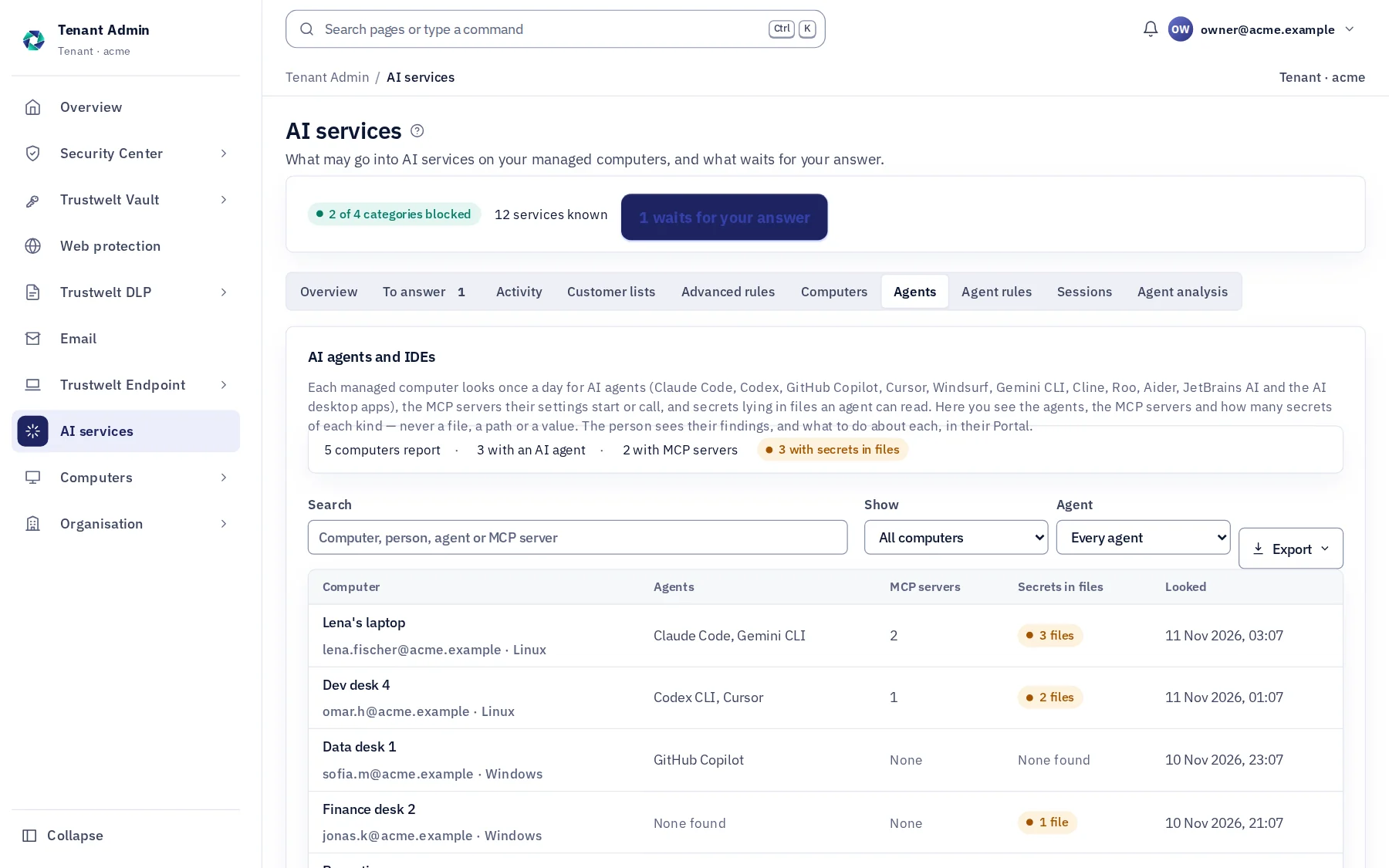
Tenant Admin sees the agents, the MCP servers and how many secrets of each kind, per computer. The person sees each finding in their Portal, where it is, and what to do about it. A person's own computer reports only when they choose.
How it works
From the console to the computer.
Look once a day
Ninety seconds after Trustwelt Desktop starts, then daily, and on "Look again": known places per operating system, no walk of the disk; project folders to a fixed depth and count, with a time limit.
Report counts
A managed computer whose organisation holds AI Security sends agents, MCP servers and secret counts; every field is checked again on the server.
Read it in Tenant Admin
AI services › Agents: computers with an agent, with MCP servers, with secrets in files; filter by agent; CSV and PDF exports, each export audited.
Fix it from the Portal
My agents lists each secret with its file and the step that removes it: move it into Trustwelt Desktop as an API key, SSH key, cloud role or database login, then delete the line or the file.
In Tenant Admin
What your administrators see.
What is recorded, and what never is
Your organisation sees this. Nothing else.
- Per computerThe agents installed with their kind and version, the MCP servers with name, transport and program or host, and the number of secret files and items by kind.
- Exports and viewsWho exported the agent inventory and when, in the audit log.
Never:
- A file's path, a key's name or a secret's value sent to the organisation: those stay with the person, in their Portal.
- A person's own, unmanaged computer, unless they chose "Show in my Portal"; withdrawing it deletes the server's copy.
- Any value read out of a file: the look reports kinds and counts, and wipes what it read.
Specification
Where it runs and how it is sold.
- Runs on
- Managed computers with Trustwelt Desktop; the places looked at are those each tool documents on Linux, macOS and Windows.
- Agents known
- Claude Code, Codex CLI, GitHub Copilot, Cursor, Windsurf, Gemini CLI, Cline, Roo Code, Aider, JetBrains AI and Junie, Claude Desktop, ChatGPT.
- Limits
- Project folders four levels under the home and two inside a project; at most 300 projects, 500 .env files, 256 KiB per file, 20 seconds.
- Sold as
- Part of Trustwelt AI Security.
Questions
Asked before buying.
- Does Trustwelt read my .env file?
- It reads the variable names and counts the lines that look like keys, on the computer, and wipes the buffer. The organisation receives the count; you receive the names in your Portal. No value is ever read out or sent.
- What happens to the secrets it finds?
- The Portal shows the step for each: move the secret into Trustwelt Desktop as an API key, SSH key, cloud role or database login, so agents use it without seeing it, then delete the line or the file and rotate what was shared.
More in Trustwelt AI Security
The other modules, and what works with this one.
- Trustwelt AI Security
Agent gateway
About Agent gateway about Agent gatewayEach tool call of Claude Code, Codex, Copilot, Cursor and Gemini CLI decided on the computer: allow, ask or refuse.
- Trustwelt AI Security
Model gateway and keys
About Model gateway and keys about Model gateway and keysModel calls through a gateway on the computer: your providers, one data gate, keys the agent never sees.
- Trustwelt Vault
Company servers
About Company servers about Company serversSSH keys for company servers, used from people's terminals and AI agents without being handed over.
- Trustwelt AI Security
AI services and categories
About AI services and categories about AI services and categoriesThe AI and language services Trustwelt knows, each approved, restricted, blocked or left open.
- Trustwelt AI Security
What goes into AI services
About What goes into AI services about What goes into AI servicesWhat is pasted, dropped, uploaded or sent is checked on the computer before the site gets it.
- Trustwelt AI Security
Policies
About Policies about PoliciesWho may send what to which service: drafted, simulated, published, versioned.
Start with Trustwelt AI Security.
AI agents on the computers comes with Trustwelt AI Security, sold on its own per person per month. An organisation account is free.