
Trustwelt Desktop · Browser extension
Fill logins from the browser. The vault stays on your computer.
The Trustwelt Desktop extension asks the vault on your computer for one login for the page you are on, and fills it. It holds no passwords of its own, it never chooses the page, and it fills only after you allowed the site.
How it works
Pair once, then click the icon on a sign-in page.
Trustwelt Desktop sets the browser up from its own settings. The extension then pairs with the vault by a code you compare on both sides, and every later conversation runs over an encrypted channel between the extension and the vault service.
Set up
In Trustwelt Desktop, Settings → Browser → Set up. The app finds the browsers on your computer and writes what each one needs.
Pair
Click the extension, then Connect. Compare the code it shows with the one in the Trustwelt Desktop window and confirm.
Allow the site
The first time on a site, Trustwelt Desktop asks whether the browser may have logins for it: once, or always.
Fill
Choose the login. Trustwelt Desktop fills the username, the password and the current one-time code. The password never appears on screen.
Which logins a page gets
Strict matching is what stops phishing.
A login is offered only where it belongs. The rules are short, written down, and tested.
- Only https and http pages
- A login saved with https is never offered on an http page.
- Registrable domain
- A login for example.com matches example.com and its subdomains. One for accounts.example.com matches that host and its subdomains, but not evil.example.com.
- The Public Suffix List
- decides what a domain is, so a login for alice.github.io is never offered on bob.github.io.
- Addresses and ports
- IP addresses and local names must match exactly, and a port in the saved address must match the page's port.
- Checked twice
- Knowing an item's identifier does not get its password on another site: the page is checked again when the secret is requested.
- The page URL comes from the browser
- The extension takes it from the browser's own sender information, never from the page and never from its own guess.
The channel
Encrypted from the extension to the vault service.
- The extension is identified by the key created at pairing, which you confirmed by code. There is no password to type into the extension.
- Messages between the extension and the vault service are encrypted and numbered, so nothing can be replayed or reordered.
- A small native helper relays frames between the browser and the vault service. It has no keys and cannot read a message.
- The vault service authorises every request as coming from a browser: it may search metadata for its origin, fetch one login for it, and read a one-time code. It may never list secrets, reveal a field or change the vault.
- Disconnect a browser, or take back a site, in Trustwelt Desktop's settings. The browser is out at once.
On the page
A small button inside the password field, drawn in a closed shadow root so the page cannot reach it, and a menu that opens on a real click only. The extension never injects a form of its own.
Keyboard
A keyboard shortcut fills the current page without touching the mouse. The menu is keyboard-navigable and the first login is focused.
Cards at checkout
Pay without typing your card. Never the security code.
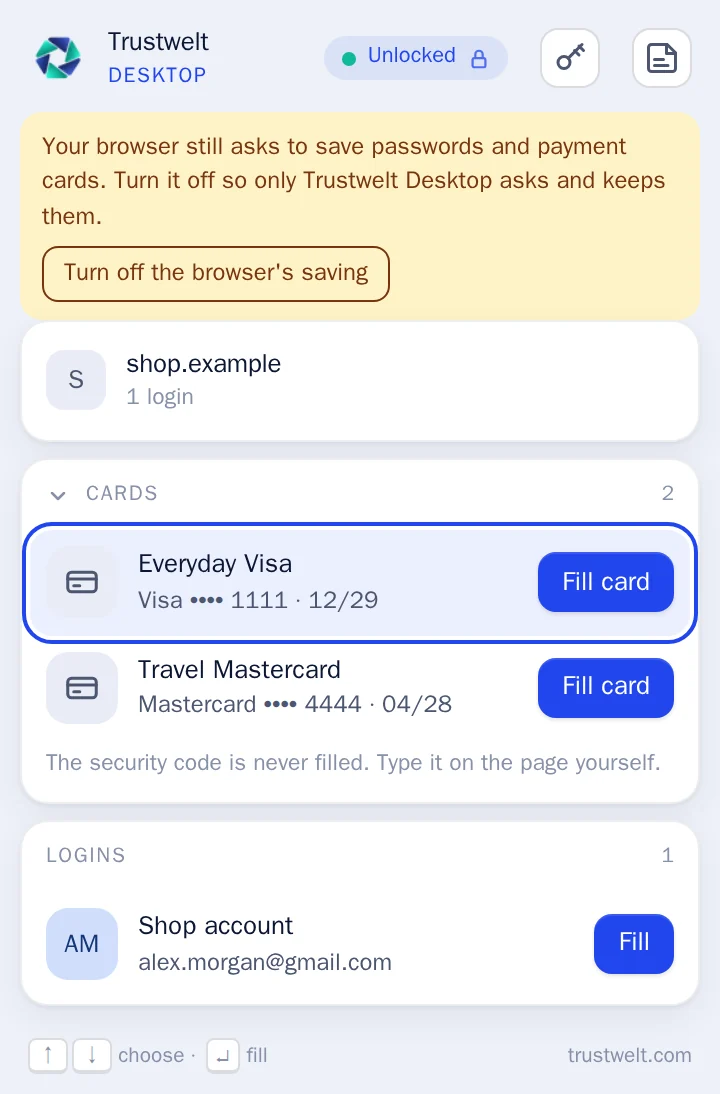
At a checkout page the extension offers your cards by their last four digits. Filling one asks for your master password in the Trustwelt Desktop window; you type the security code on the page yourself.
- Card fill works on secure pages you have allowed, and inside a checkout frame only for known payment processors.
- The extension reads a visible total on the page as a hint for the confirmation. It is never taken as the truth.
- Paid with a card the vault does not know? The extension offers to save it, after you confirm in Trustwelt Desktop, without the code.
- A company card is filled the same way, under a one-time permission from your organisation, and its number is never shown to you.
The browser's own saving
A reminder while the browser still keeps passwords itself.
A browser that keeps saving passwords and cards defeats the point of a vault. The extension shows a notice while that is on, and can turn it off for you.
- A badge and a popup notice while the browser's password or card saving is on.
- One click turns it off, with the browser's own permission prompt. When a policy set by your organisation or another extension holds the switch, the notice says so.
- Trustwelt Desktop can also remove the cards the browser kept once they are in your vault, and delete the security codes the browser held with them.
Browsers
Chromium and Firefox families, on every desktop platform.
| Browser | Linux | macOS | Windows |
|---|---|---|---|
| Google Chrome, with Beta and Dev | Included | Included | Included |
| Chromium | Included | Included | Included |
| Microsoft Edge, with Beta and Dev | Included | Included | Included |
| Brave | Included | Included | Included |
| Vivaldi, with Snapshot | Included | Included | Included |
| Opera | Included | Included | Not included |
| Arc | Not included | Included | Not included |
| Mozilla Firefox | Included | Included | Included |
| LibreWolf | Included | Included | Included |
| Waterfox | Included | Included | Included |
| Floorp | Included | Included | Not included |
| Zen | Included | Included | Not included |
Browsers installed as Flatpak or Snap packages run in a sandbox that keeps the extension from reaching the vault; use the vendor's package instead.
Questions
Common questions about the extension.
- Does the extension store my passwords?
- No. The extension keeps only its pairing key. Every login it fills comes from the vault service on your computer at that moment, over an encrypted channel, and only for the page you are on.
- What does pairing do?
- Pairing gives the extension a key that Trustwelt Desktop recognises. You compare a short code shown by both sides and confirm it in the Trustwelt Desktop window. From then on the extension is identified by that key, and you can disconnect it in Trustwelt Desktop's settings at any time.
- Why does it ask before filling on a new site?
- Trustwelt Desktop releases a login only to a site you have allowed, once or always. Together with the matching rules, that is what keeps a lookalike page from receiving your password.
- Can it fill my card's security code?
- No. The security code is never stored in the vault, so it cannot be filled. You type it on the payment page yourself.